Mahadev Capcut Template – Hello friends, welcome to today’s new article. Today I have brought another trending Mahadev video editing tutorial for you. Friends, you may have seen this type of devotional video editing going viral on social media. The good thing is that you can create a similar video very easily with the help of a CapCut template. I am sharing the template link in this article, which you can use to automatically edit your video. However, before using the template, it is important to understand how the editing works and what type of clip you need. So, in this article, I will explain the complete process of Mahadev CapCut video editing and how you can create this trending devotional video using the template.
Details Of Mahadev CapCut Template
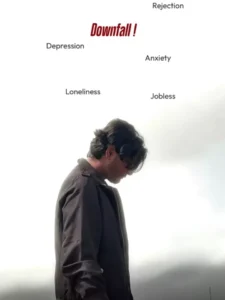
Friends, let’s now talk about the editing style used in this viral Mahadev CapCut template. This is a devotional-style edit based on Lord Shiva, with a powerful and emotional concept. The video starts with a person standing in a sad or serious pose, while the text “Downfall” appears in the background. After that, different words such as “Depression,” “Anxiety,” “Failure,” and “Loser” appear one after another, representing the struggles and difficult situations in life. After the transition, the mood of the video changes completely. The person is shown looking toward the sky, while a large and powerful image of Lord Shiva appears in the background. Lightning and cinematic effects are also added to create a dramatic devotional atmosphere. The overall concept shows that even during difficult times, having faith in Lord Shiva can give strength and hope. You can replace the original person’s clip with your own video and create a similar Mahadev-themed edit using the template.
Benefits Of Using CapCut Template
There are many benefits to using a CapCut template for video editing. The biggest advantage is that you can create a professional-looking video in a very short time without having advanced editing skills. All the major editing elements, including effects, transitions, text, filters, music, and animations, are already added to the template. You simply need to add your own video clip, and the preset editing will automatically be applied to it. This is especially useful for beginners who want to create trending social media videos without spending hours editing manually. You can complete the entire editing process directly from your phone and create a stylish video within a few minutes.
How To Use Mahadev Capcut Template
Friends, if you want to edit your videos using CapCut templates, the process is quite simple. Before using any template, ensure that the CapCut app is installed on your phone. Next, open the CapCut app and tap on the ‘Discover’ option; here, you will find a vast array of templates. You can also use the search bar to look up a specific template by name. However, if this method doesn’t work for you, I have another solution—just follow these step-by-step instructions.
- First, click the ‘Check Template’ button provided in the article;
- this will open the template directly in CapCut.
- You will then see a preview of the template along with a ‘Use’ button at the bottom.
- Tap the ‘Use’ button, add your video clips, and then tap the final button to proceed.
- The template will edit and prepare your video in moments, allowing you to save it.
Conclusion
So friends, this is how you can create a trending Mahadev video using a CapCut template. The entire editing process is simple, and you do not need professional editing skills. Just add a suitable video clip to the template and let the preset effects and transitions create the final video automatically. The template link has been provided in this article for your convenience. Please note that the template belongs to CapCut, and we do not claim ownership of it. You can use it directly through the CapCut application.
If you want more unique and trending CapCut templates and video editing tutorials, keep visiting our website. Here, you will find new templates and easy editing guides to help you create trending videos for social media.