15 August CapCut Template – Friends, as we all know, Indian Independence Day is celebrated every year on 15 August to commemorate India’s independence. With Independence Day approaching, 15 August-themed photo and video editing trends are once again becoming popular across social media. Creators are making patriotic photos, reels, and videos and sharing them on Instagram, Facebook, and other platforms. If you also want to create a viral 15 August video edit but don’t know how to edit it manually, then don’t worry. In this article, I’m going to show you an easy way to create this trending Independence Day video using a CapCut template. The template already contains the required effects and editing, so you only need to add your own video clip. Follow the article to learn the complete process.
Details Of 15 August CapCut Template
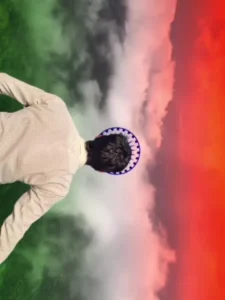
Friends, this viral Independence Day video will be created with the help of a CapCut template. The template is specially designed around the 15 August theme and includes patriotic visual effects. In the template preview, you’ll see a boy standing and spreading his arms toward the sky. In the next scene, the Indian tricolor flag appears beautifully in the background. The original background is removed and replaced with the Indian flag, creating a realistic patriotic atmosphere. The template also includes bracket-style effects, smooth slow-motion, and other cinematic effects that enhance the overall look of the video. You can check the complete editing in the template preview before using it. Now let’s understand how to prepare the video clip for this editing.
How To Prepare A Clip For This Editing?
Friends, before using this 15 August CapCut template, you need to record a suitable video clip. The right footage will help you achieve a result similar to the viral Independence Day videos currently trending on social media. First, choose a suitable location where the sky is clearly visible in the background. Set your camera at a slightly high angle and position yourself in front of it. Look toward the sky while spreading both of your arms naturally, creating a patriotic and cinematic pose. Record the clip for around 4–5 seconds while keeping your movements smooth and natural. Once your video is ready, open the CapCut template and add the recorded clip. The template will automatically apply the required effects and transform your normal footage into a 15 August-themed video. The template link is provided through the button below the image in this article. You can open it and follow the template-use process to complete your editing.

How To Use 15 August CapCut Template
Friends, if you want to edit your videos using CapCut templates, the process is quite simple. Before using any template, ensure that the CapCut app is installed on your phone. Next, open the CapCut app and tap on the ‘Discover’ option; here, you will find a vast array of templates. You can also use the search bar to look up a specific template by name. However, if this method doesn’t work for you, I have another solution—just follow these step-by-step instructions.
- First, click the ‘Check Template’ button provided in the article;
- this will open the template directly in CapCut.
- You will then see a preview of the template along with a ‘Use’ button at the bottom.
- Tap the ‘Use’ button, add your video clips, and then tap the final button to proceed.
- The template will edit and prepare your video in moments, allowing you to save it.
Conclusion
So friends, this is how you can easily create a 15 August CapCut video for Independence Day using a trending template. The process is simple because you don’t need to perform the editing manually. Just record a suitable clip, open the template, add your footage, and let CapCut apply the complete editing automatically.
I’ve shared the template link along with the complete process in this article so you can create your own patriotic video without any difficulty. Create your 15 August video, express your patriotism, and share it with your friends and followers on social media. For more unique and trending video editing templates, keep visiting our website.