Trending Bike AI Video Editing is one of the latest AI video trends going viral across Instagram, YouTube Shorts, and Facebook. Creators are transforming simple bike photos into cinematic AI videos that look professional and realistic. The best part is that you don’t need any editing skills to create them. With the right AI tool and prompt, you can generate an eye-catching bike video in just a few minutes. In this article, I’ll show you the complete process step by step.
About This Trending Bike AI Video Editing
In this video, you will see a girl riding a scooter up to a riverbank. Ahead, there is a boat in the river and a crowd, suggesting a harbor or a commercial port. The girl rides her scooter into the water; it suddenly transforms into a boat, and she continues on her way. In the next scene, that boat-scooter transforms into a helicopter, and she flies off into the sky. The scene looks incredibly realistic, and you can easily create it using an AI tool. I will explain the process in the following paragraphs, so please keep reading.
Edit With Flow AI
Flow AI is Google’s powerful AI video generation tool that can convert images and text prompts into realistic videos. It supports image-to-video and text-to-video generation, making it perfect for creating trending AI edits. For this bike edit, you’ll only need two clear photos of your motorcycle along with the prompt provided in this article. After uploading the images and prompt, Flow AI automatically creates a smooth cinematic video with realistic motion and visual effects.
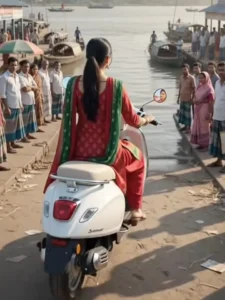
Use the uploaded image as the exact character reference. Preserve the person's face, hairstyle, clothing, body proportions, and identity perfectly throughout the entire video. Maintain cinematic realism with smooth transitions and no morphing artifacts.

Scene 1 (0–3 sec):
A young man is riding a modern motorcycle along a beautiful riverside road during golden hour. The camera follows from behind and then slowly moves to a cinematic side angle. The river sparkles under warm sunlight, trees sway gently, and realistic dust and wind effects add motion.

Scene 2 (3–6 sec):
As the motorcycle reaches the edge of the river, it smoothly transforms into a sleek luxury speedboat without stopping. The transformation is highly detailed with realistic mechanical parts folding and reshaping. The boat immediately begins gliding across the river, creating realistic water splashes, ripples, reflections, and cinematic spray. The camera circles around the boat with dynamic drone-like movements.

Scene 3 (6–8 sec):
While speeding across the water, the speedboat transforms into a premium helicopter. Rotors unfold smoothly, the engine starts realistically, and the helicopter lifts off naturally from the river surface. Water droplets fall away as it ascends into the sky. The camera pulls back into a breathtaking aerial cinematic shot showing mountains, forests, and the winding river below. Ultra-realistic, Hollywood-quality VFX, dramatic lighting, volumetric sun rays, realistic reflections, smooth camera motion, 4K HDR, vertical 9:16.
How To Generate Your Video
Creating this AI bike video is very simple. First, click the “Generate Video” button to open the Flow AI website and sign in with your Google account. Create a new project, select the Frame to Video option, and upload your bike photos. Then copy the prompt provided in this article and paste it into the prompt box. Finally, click Generate and wait a few moments while the AI creates your video. Once it’s ready, preview the result and download it in high quality.
Conclusion
Creating trending AI bike videos has become easier than ever with Flow AI. By using just a few photos and the right prompt, you can generate cinematic videos that are perfect for Instagram Reels, YouTube Shorts, and other social media platforms. Follow the steps shared in this guide, and you’ll have your own professional-looking AI bike video in minutes. Visit our website regularly for more trending AI video editing tutorials and prompts.