Eye Close-Up CapCut Template – Friends, if you are active on social media, you may have already seen this Eye Close-Up CapCut Template trending on Instagram. The editing style is quite creative and focuses mainly on eye close-up effects, smooth transitions, and cinematic visuals. Many creators are using this trend for Reels and short videos. If you also want to create a similar viral video but don’t know how to edit it manually, you can easily create it with the help of a CapCut template. In this article, I’ll explain the editing style, how to prepare your video clip, and how you can use the template to create your own video.
Details Of Eye Close-Up CapCut Template
Friends, let’s first understand the editing used in this viral template. The video begins with a person combing their hair, while a blur effect appears for a short moment. The clip then becomes clear, followed by a smooth transition that zooms toward the subject’s eyes. After the zoom-in, the footage changes into a black-and-white look, highlighting the eyes and giving the video a dramatic cinematic appearance. Vibration and compression-style effects are also used to enhance the overall visual impact. The combination of the close-up eye shot, black-and-white filter, zoom transition, and additional effects creates a unique aesthetic look. With the provided CapCut template, you can apply the same editing style to your own video without doing everything manually.
How To Prepare Your Video Clip For Editing?
Friends, to get a good result from this template, you first need to record your video according to the editing style. Choose a suitable location, preferably a clean room or background, and place your phone camera properly. Start the recording with your head slightly lowered and move your hand naturally through your hair. After that, record a few close-up shots focusing specifically on your eyes. Try recording the eye portion from three or four slightly different angles so you have enough footage to match the template. Keep your movements smooth and record the clips in good lighting. Once your footage is ready, add it to the template, and CapCut will automatically apply the required transitions, filters, zoom effects, and other editing elements.
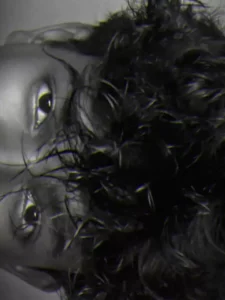
How To Use Eye Close-Up CapCut Template?
Friends, after knowing all this, just a small paragraph remains on how you’ll do it. What’s the method for doing it, and how to do it. Now, using this easy method, we can prepare our video and make it viral very easily. To do this, first come to our website and click on “Check Template.” Click on the template below and set your clip. The entire article on clips provides information on how to add clips, or if you only have photos, how to create unique videos using your photos. I’ve explained all of this. In this article, you can carefully read the article from there, then add your clips and so on, and click “Next” to prepare your video. The result will be quite impressive, and the result will be exactly as you saw in the preview.
Conclusion
So friends, this is how you can create the trending Eye Close-Up CapCut Template video using your own clips. I’ve explained the complete process, from recording the right footage to using the template for automatic editing. The template link is provided in the article, so you can open it and create your own eye-effect video easily. For more unique and trending CapCut templates and video editing tutorials, keep visiting our website.