Happy Birthday Ai Video Editing – Friends, now an AI video editing is going viral on social media in which a birthday voice video has been made and this video has been played with the help of AI in such a way that it looks absolutely real. Everyone is saying after seeing it that it looks like a real video but this birthday voice video has been made with the help of AI. In this, people are seen celebrating their birthday in a very special way. Friends, now you can also make such AI birthday video for yourself. If your birthday is coming or the birthday of any of your friends or acquaintances is coming then you can make such AI video for them or for yourself absolutely free. And that’s exactly what I’ll teach you in today’s article. I’ll guide you through this article by providing a video prompt that clearly outlines all the details of this birthday voice video. When you use this video prompt in AI, your birthday voice video will be ready. So, let’s read this article to find out.
Details Of Happy Birthday Ai Video Editing
Watch this video editing. As I told you, it’s an AI video created with a very realistic look. I’ll explain what you’ll see in it. In this video, you’ll see a boy, who was used as an example, replace him with your video. This boy sits on a dusty bench, holding a cake with a burning candle in one hand and a glass bottle in the other. He then brings the cake to his face in a shade, holding a Louis Vuitton candle in his other hand, and simultaneously blows passionately on the lit candle on the cake. The air from his mouth creates a large fireball on the cake, and foam shoots upward from the bottle in his other hand. At this moment, the video slows down, and this scene looks quite realistic. So, friends, you can make a similar video too. Let me explain the process.
What Yoy Need To Do This Video Editing?
Let me explain what you need to create this AI video. To use this template, you need three things: first, you need a clear face voice image to reference so your face matches the AI video. Prepare a photo that shows your face. Now, you need to write a prompt for creating the video, detailing the video’s look and feel. This is the most important part of editing. You’ll be able to create an AI video without a prompt. So, you don’t have to write a prompt. In this article, I’m also providing you with a prompt for this birthday voice video. You’ll find a video prompt below the image. Copy it. Now, we’ll use both of these things in an AI tool. The best tool for creating videos for free and getting good results is Google Flow AI. Now you can use it to create your own videos. If you want to know how to use Flow AI, read the How to Use paragraph below.
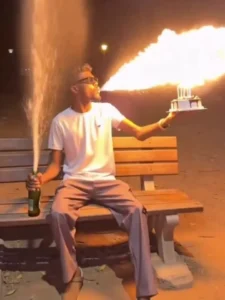
Video Prompt –
Ultra-photorealistic live-action cinematic video, 6 seconds, one continuous uninterrupted take, vertical 9:16, captured with a completely static locked-off camera. No cuts, no transitions, no zoom, no camera movement, no slow motion, and no camera shake. Use the uploaded reference image as the only facial identity reference and preserve the person's identity with absolute consistency throughout the entire video. The face must remain exactly the same, including facial structure, eyes, eyebrows, nose, lips, beard, beard density, skin tone, skin texture, hairstyle, hairline, ears, jawline, neck proportions, and natural expression. Do not regenerate, beautify, stylize, age, morph, or alter the face in any way. Maintain perfect temporal consistency with no identity drift, no flickering, and no frame-to-frame facial changes. The man wears a premium luxury all-black oversized outfit consisting of a tailored oversized black blazer, premium black t-shirt, relaxed black trousers, and elegant black leather loafers. The clothing has realistic fabric simulation with subtle natural movement and a clean modern luxury aesthetic.

The scene takes place at night in an elegant city park with a realistic wooden bench surrounded by natural trees, warm cinematic street lamps, soft atmospheric haze, rich golden practical lighting, volumetric light rays, realistic reflections, beautiful film-quality bokeh, and a premium luxury urban atmosphere. Everything should resemble authentic live-action footage captured on an ARRI ALEXA 65 using premium anamorphic cinema lenses with ultra-high dynamic range, cinematic color grading, filmic contrast, realistic skin pores, authentic shadows, natural reflections, physically accurate lighting, and maximum photorealism.

The man calmly walks into the frame with relaxed confidence while carrying a realistic birthday cake with lit number "26" candles in one hand and a real champagne bottle in the other. His movement is smooth, natural, and physically believable with realistic body mechanics, natural breathing, blinking, eye movement, posture, balance, and accurate weight distribution. He walks toward the wooden bench and smoothly sits down while continuing to hold both the birthday cake and the champagne bottle. The birthday cake is never placed on the bench at any time. He comfortably holds the cake in front of his chest with one hand while holding the champagne bottle in the other. After sitting, he gently shakes the champagne bottle with controlled excitement while maintaining a secure grip on the birthday cake. Every movement feels natural with believable arm weight, realistic hand interaction, and authentic human motion.

He then forcefully strikes the bottom of the champagne bottle against the wooden bench. At the exact same cinematic moment, he naturally leans forward and blows out the birthday candles while the champagne cork instantly launches into the air and the champagne erupts upward in a powerful fountain. The candle blow, cork pop, and champagne explosion happen in perfect synchronization during the same instant. The champagne spray features physically accurate fluid simulation with realistic pressure, continuous liquid flow, fine droplets, sparkling reflections, mist, natural splash behavior, and authentic motion.

As he blows out the candles, his breath smoothly transforms into an ultra-realistic cinematic stream of fire. The transition is seamless and physically believable, growing naturally from his breath into a bright, powerful flame. The fire illuminates his face, beard, hair, hands, black outfit, birthday cake, champagne bottle, wooden bench, nearby trees, and the surrounding environment with realistic orange light. The flame includes glowing embers, sparks, rolling smoke, heat distortion, volumetric lighting, realistic flame turbulence, and natural light interaction. The champagne spray and the fire coexist naturally with correct physical interaction, without clipping, unrealistic overlap, or visual artifacts. The entire sequence should look like practical Hollywood visual effects captured in-camera with exceptional realism rather than CGI.

Negative Prompt: AI look, CGI appearance, cartoon style, animation, stylized rendering, beauty filter, identity drift, face replacement artifacts, facial flicker, face morphing, age change, outfit change, camera movement, zoom, cuts, transitions, slow motion, fast motion, shaky camera, duplicate people, duplicate body parts, extra fingers, deformed hands, distorted face, object clipping, floating objects, broken liquid physics, unrealistic fire, poor lighting, blurry details, low quality, temporal inconsistency, text, subtitles, logos, watermark, compression artifacts, oversaturated colors, unrealistic shadows, or unnatural body movement.
How To Generate Your Video
Creating this AI bike video is very simple. First, click the “Generate Video” button to open the Flow AI website and sign in with your Google account. Create a new project, select the Frame to Video option, and upload your bike photos. Then copy the prompt provided in this article and paste it into the prompt box. Finally, click Generate and wait a few moments while the AI creates your video. Once it’s ready, preview the result and download it in high quality.
Conclusion
So, this is how you can easily and free create this viral birthday video using AI. I’ve explained the process correctly and accurately, and I guarantee you’ll have no problem creating this video with AI. Friends, I hope you’ll enjoy this editing and please give us your feedback so we can continue teaching you how to edit unique and trending videos like this.