Monsoon AI Video Editing is one of the latest AI trends taking over Instagram, YouTube, and Facebook. As the rainy season approaches, creators are making beautiful cinematic videos featuring lush green fields, falling rain, and peaceful village scenery. If you’ve seen these viral monsoon reels and want to create one yourself, you can do it completely free with the help of AI tools. In this article, you’ll learn everything you need to know, from understanding the trend to generating your own professional-quality monsoon AI video.
What Is Monsoon AI Video Editing?
Monsoon AI Video Editing is an AI-powered editing style where a still image is transformed into a realistic rainy-season video using AI prompts. The videos typically feature green landscapes, farmers working in fields, village roads, cloudy skies, and gentle rainfall. Birds flying across the sky, soft lighting, and cinematic camera movement make the final result look natural and immersive. Because of its realistic visuals and peaceful atmosphere, this editing style has become one of the fastest-growing AI trends on social media.
Why Is This Trend Going Viral?
People on Instagram, YouTube, and Facebook are always looking for fresh and visually appealing content. Monsoon AI videos stand out because they create a realistic rainy-season experience with beautiful natural scenery and cinematic visuals. Their emotional atmosphere and high-quality animation make viewers stop scrolling, which is why these videos are receiving millions of views, likes, and shares across social media platforms.
Features Of Monsoon AI Videos
These AI-generated videos include realistic rainfall, dark monsoon clouds, lush green landscapes, birds flying in the background, and cinematic color grading. Most videos also feature slow-motion camera movements, soft lightning flashes, and high-quality 4K visuals. The combination of natural lighting and smooth animation creates a premium, movie-like appearance that closely resembles professionally shot footage.
How To Create Monsoon AI Videos?
Creating a Monsoon AI video is simple. First, copy the image prompt provided in the article and paste it into an AI image generator such as ChatGPT or Google Gemini to generate your monsoon scene. Download the generated image, then copy the video prompt from the article. Open the YouTube Create app (or another supported AI video generation tool), select the Generate Video option, upload your generated image, paste the video prompt, and click Generate. After a short wait, your cinematic monsoon AI video will be ready to download in high quality.
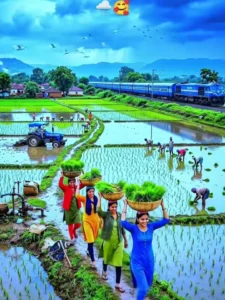
Image Prompt –
Ultra-realistic Indian monsoon countryside, flooded green rice paddy fields with farmers transplanting rice seedlings, four beautiful young Indian women walking barefoot on a narrow grassy bund, carrying large woven bamboo baskets full of fresh rice seedlings on their heads, colorful traditional salwar kameez (royal blue, green, yellow, red), smiling naturally, blue passenger train passing in the background, blue tractor working in another paddy, white egrets flying across the sky, dramatic dark blue monsoon clouds, distant green hills, reflective water, lush greenery, cinematic composition, vibrant natural colors, photorealistic, HDR, ultra-detailed, 8K, DSLR photography, sharp focus, depth of field, volumetric lighting, National Geographic style, highly detailed faces, realistic water reflections, vertical composition –ar 9:16
Video Promot –
Create a cinematic, ultra-realistic 8-second video from the reference image. Keep the same composition, characters, clothing, train, rice fields, and environment. Four young Indian women walk naturally along the narrow paddy path while balancing bamboo baskets filled with fresh rice seedlings on their heads. Their clothes and hair gently move in the monsoon breeze. Farmers in the rice fields continue planting seedlings with realistic body movements. The blue passenger train smoothly travels across the background from left to right. White egrets fly across the dramatic cloudy sky with natural wing motion. Water in the paddy fields shows realistic ripples and reflections. Trees sway gently in the wind, creating a peaceful rural atmosphere. Soft monsoon daylight, photorealistic, HDR, cinematic camera movement with a slow forward dolly, shallow depth of field, ultra-detailed, natural colors, 4K, stable camera, realistic physics, no flickering, no distortion, no extra people, no text, no logos, no emojis.
Tips For Better Results
For the best output, always use a high-resolution image and export your video in 4K quality. Keep the rain effect realistic instead of excessive, use smooth transitions, and apply cinematic color grading for a professional finish. Adding trending rain-themed background music can also make your final video more engaging and increase its chances of performing well on social media.
Can Beginners Create These Videos?
Absolutely. One of the biggest advantages of AI video generation is that you don’t need any editing experience. Simply follow the prompts, upload your image, and let the AI generate the video automatically. With a little practice and creativity, anyone can create stunning monsoon AI videos without learning professional editing software.
Conclusion
Monsoon AI Video Editing is more than just a temporary trend—it’s becoming a popular style of AI content creation across social media. If you want to create unique and eye-catching videos for Instagram, YouTube, or Facebook, this editing style is a great choice. Follow the steps in this guide, experiment with different prompts, and keep creating consistently to improve your results. If you’re looking for more trending AI prompts and video editing tutorials, be sure to explore our website for the latest updates.