Viral Sunset River Photo Editing Prompts: Social media trends change quickly, but some editing styles capture everyone’s attention for months. One of the latest trends dominating Instagram and other social platforms is the Viral Sunset River Photo Editing style. These photos feature a person standing on a rock or shallow area in a river while a beautiful sunset fills the sky with golden and orange tones.
The combination of water reflections, dramatic lighting, and cinematic colors creates a breathtaking visual effect. As a result, these images receive high engagement, attract more viewers, and often become viral. If you have been seeing these stunning photos across Instagram and wondering how to create one for yourself, this guide will show you everything you need to know.
Why Sunset River Photos Are Trending
Over the past few months, sunset-themed photography has become one of the most popular visual trends on Instagram. People are constantly searching for unique and eye-catching content that stands out from ordinary pictures.
A sunset river photo offers exactly that. The warm golden sunlight reflecting on the water creates a magical atmosphere that instantly grabs attention. Unlike standard portraits, these images tell a story and create an emotional connection with viewers.
Another reason for their popularity is their cinematic appearance. The rich colors, glowing sky, and reflective water make the image look professionally edited, even when created using AI tools.
Content creators, influencers, and casual social media users are all embracing this trend because it helps their profiles look more attractive and professional.
What Makes These Photos Look So Aesthetic?
The beauty of a sunset river image comes from several visual elements working together:
Golden Hour Lighting
Sunset lighting naturally adds warmth and depth to photographs. The golden glow makes skin tones appear softer and more appealing.
Water Reflections
The river acts like a mirror, reflecting the colors of the sky and creating a dramatic visual effect.
Cinematic Color Grading
Orange, gold, blue, and purple tones blend together to produce a movie-like appearance.
Natural Environment
Rivers, rocks, mountains, and trees add depth and realism to the image.
Human Subject
A person standing calmly in the scene creates a powerful focal point that draws the viewer’s attention.
Together, these elements create a visually stunning image that performs exceptionally well on social media.
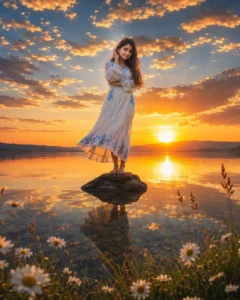
Prompt:-
Ultra-realistic cinematic sunset lakeside scene, golden hour lighting, 4:5 portrait ratio. A young woman stands barefoot on a small dark rock in calm crystal-clear water, centered composition, wide-angle (24mm). Use the face from the uploaded reference image, matching facial features accurately. She wears a flowing white dress with blue floral embroidery, long dark hair blowing softly in the breeze, face partially hidden by hair and hand, creating a dreamy emotional mood. Low sun on the horizon directly behind her, casting warm orange and golden reflections across still water. Dramatic sky filled with glowing scattered clouds, rich blue-orange contrast, radiant sun rays spreading across the sky. Perfect mirror reflection of subject, sky, and sunlight on the water surface. Foreground includes wild daisies, green grass, and natural lakeside plants for depth and realism. Ultra-detailed textures, realistic skin and fabric, HDR, sharp focus, vibrant colors, cinematic color grading, DSLR photography style, Canon EOS R5, f/4, 8K, masterpiece nature portrait.
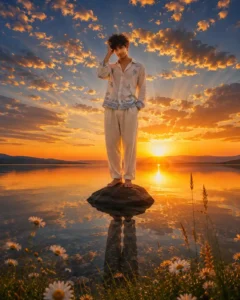
Prompt:-
Ultra-realistic cinematic sunset lakeside scene, golden hour lighting, 4:5 portrait ratio. A young man stands barefoot on a small dark rock in calm crystal-clear water, centered composition, wide-angle (24mm). Use the face from the uploaded reference image, matching facial features accurately. He wears a light flowing shirt with subtle blue detailing and relaxed trousers, long dark hair moving softly in the breeze, face partially hidden by hair and hand, creating a dreamy and emotional mood.
Low sun on the horizon directly behind him, casting warm orange and golden reflections across still water. Dramatic sky filled with glowing scattered clouds, rich blue-orange contrast, radiant sun rays spreading across the sky. Perfect mirror reflection of subject, sky, and sunlight on the water surface.
Foreground includes wild daisies, green grass, and natural lakeside plants for depth and realism. Ultra-detailed textures, realistic skin and fabric, HDR, sharp focus, vibrant colors, cinematic color grading, DSLR photography style, Canon EOS R5, f/4, 8K, masterpiece nature portrait.
How to Create a Viral Sunset River Photo
Creating your own trending sunset river image is much easier than many people think. Modern AI tools can generate highly realistic results within minutes.
Follow these simple steps:
Step 1: Download the Background Image
Start by downloading a high-quality river background image that includes rocks, water, and an open view of the sunset.
Choose a background with clear details and sufficient space where your subject can be placed naturally.
Step 2: Prepare Your Portrait
Select a clear photo of yourself. Images with good lighting and a visible face generally produce the best results.
Avoid blurry or low-quality images because they can reduce the realism of the final output.
Step 3: Copy the AI Prompt
Use a carefully crafted sunset river editing prompt designed for AI image generation. The prompt should describe:
- Golden sunset lighting
- River reflections
- Cinematic atmosphere
- Realistic shadows
- Detailed background
- Natural subject placement
- High-resolution output
A detailed prompt helps AI understand exactly what type of image you want to create.
Step 4: Upload Your Images
Open your preferred AI image generation platform.
Upload:
- Your portrait photo
- The river background image
These images will help the AI create a more personalized and realistic result.
Step 5: Paste the Prompt
Paste the copied sunset river prompt into the AI tool.
Make sure the prompt includes details about lighting, reflections, atmosphere, color grading, and composition.
Step 6: Generate the Image
Click the generate button and allow the AI to process your request.
Depending on the platform, image generation may take a few seconds or a few minutes.
Step 7: Save and Share
Once the image is ready, review the final result.
If you are satisfied, download the photo and save it to your device.
You can then upload it to Instagram, Facebook, Threads, or any other social platform.
Tips to Make Your Sunset River Photo More Viral
Want even better results? Follow these expert tips:
Use High-Quality Images
The better your original photos, the better the AI-generated result will be.
Focus on Natural Poses
Simple standing poses often look more realistic than complicated poses.
Add Depth to the Scene
Include mountains, trees, or distant landscapes for a more cinematic appearance.
Use 4K Resolution
Higher-resolution images appear sharper and more professional.
Follow Current Trends
Monitor popular Instagram reels and posts to understand what editing styles are currently receiving the most engagement.
Benefits of Using AI Photo Editing Prompts
AI photo editing has transformed the way people create content online.
Some major benefits include:
- Fast image creation
- Professional-quality results
- No advanced editing skills required
- Unique and creative designs
- Better social media engagement
- Time-saving workflow
With the right prompt, almost anyone can create stunning visual content that looks professionally edited.
Final Thoughts
Viral Sunset River Photo Editing Prompts have become one of the hottest Instagram trends because they combine natural beauty, cinematic lighting, and artistic creativity. The glowing sunset, reflective river water, and dramatic scenery create an unforgettable visual experience that attracts viewers instantly.
If you want your social media profile to stand out, this editing style is worth trying. By using a quality background image, a detailed AI prompt, and a clear portrait photo, you can create breathtaking sunset river photos within minutes.
As new trends continue to emerge, staying updated and experimenting with creative editing styles can help you increase your reach, engagement, and visibility across social media platforms.