Cinematic Ai Photo Editing Prompts – Viral Cinematic AI Photo Trend Explained: A fresh AI photo trend is taking over social media platforms, with users creating stunning cinematic-style images that look straight out of a professional photoshoot. These eye-catching edits combine multiple photos into a creative collage while adding music-inspired elements, giving the final image a stylish and artistic appearance. Because of their realistic look and premium feel, these AI-generated photos have quickly become popular among social media users.
If you want to create similar images for yourself, the process is much easier than you might think. Modern AI tools can generate highly realistic results that closely match the viral trend everyone is sharing online. In this guide, you’ll learn the complete editing process along with carefully crafted prompts that can help you create impressive cinematic AI photos within minutes.
What Makes Cinematic AI Photos So Popular?
This editing style has gained massive attention among both men and women due to its unique visual appeal. The final image usually features multiple versions of the same person arranged in a creative collage layout. Each section showcases a different pose, expression, or camera angle, making the overall design more dynamic and engaging.
One image may capture a smile, while another shows a thoughtful look or a side profile. To enhance the mood, AI applies cinematic color grading with retro-inspired tones, creating a professional and artistic finish. Many of these designs also include music-related graphics, such as song titles or audio player elements, giving the impression that the image is connected to a favorite soundtrack. Decorative details like flowers, light effects, and vintage-inspired accents are often added to make the composition even more attractive.
How to Create Cinematic AI Photos
Creating these trending AI images is simple and requires only a few steps. Popular AI platforms such as ChatGPT and Google Gemini are commonly used because they produce high-quality results with minimal effort.
To get started, copy one of the AI prompts provided in this article. Then open your preferred AI image-generation tool and paste the prompt into the chat or image creation section. Upload your photo using the image upload option, and submit the request. Within a short time, the AI will generate a cinematic collage-style image based on your photo.
The final result often looks surprisingly realistic and professional, delivering an image that feels even more impressive than what you originally imagined.
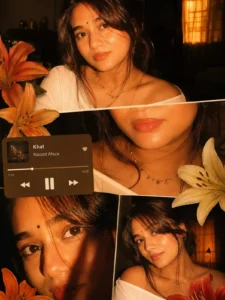
Prompt:-
“Ultra-realistic cinematic collage of a young woman using the uploaded face exactly.The image is composed of multiple rectangular photo panels layered vertically and diagonally, creating a scrapbook-style layout. Each panel shows close-up and mid-shot portraits of the same girl in a dim indoor room.Lighting: strong, warm, golden-orange direct flash lighting hitting the face from the front-left, creating high contrast, deep shadows, and a glowing skin effect.Background remains dark with visible window curtains slightly illuminated. Harsh highlights on cheekbones, nose, and lips.Slight film grain and soft blur for a dreamy vintage feel. Color grading: intense amber, burnt orange, and golden tones dominating the entire image.High saturation, slightly crushed blacks, and glowing highlights.Subject styling: messy tied-back hair with loose strands falling on face, glossy lips, subtle eyeliner, dewy skin. Wearing a delicate necklace with small pendants and a casual off-shoulder white top.Composition details:Top panel: serious expression, looking directly at camera.Middle panel: cropped lips and necklace close-up.Bottom left: extreme close-up of eyes with strong shadow split across face.Bottom right: angled portrait with soft side gaze.Panels overlap slightly with uneven spacing for aesthetic collage look.Overlay elements:Add realistic flower stickers (lilies in orange, cream, and red tones) placed around the collage.Add a music player Ul card in the center-left area with a soft rounded design.Music player text:Title: "salvatore"Artist: "Lana del rey"Include minimal playback bar and icons (play/pause, skip).Final touches:Slight glow/bloom effect on highlightsSubtle vignette around edgesFlash photography look, like taken on a digital camera at nightMaintain natural skin texture, avoid over-smoothing”
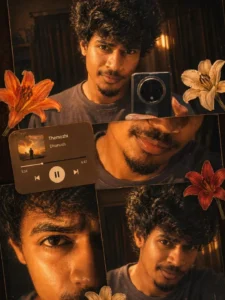
“Ultra-realistic cinematic collage of a young Man using the uploaded face exactly. The image is composed of multiple rectangular photo panels layered vertically and diagonally, creating a scrapbook-style layout. Each panel shows close-up and mid-shot portraits of the same girl in a dim indoor room. Lighting: strong, warm, golden-orange direct flash lighting hitting the face from the front-left, creating high contrast, deep shadows, and a glowing skin effect. Background remains dark with visible window curtains slightly illuminated. Harsh highlights on cheekbones, nose, and lips. Slight film grain and soft blur for a dreamy vintage feel. Color grading: intense amber, burnt orange, and golden emozhi tones dominating the entire image. High saturation, slightly crushed blacks, and glowing highlights. Subject styling: messy back hair, glossy lips, dewy skin. Wearing a casual tee. Composition details: Top panel: serious expression, looking directly at 11 camera. Middle panel: cropped lips and necklace close-up. Bottom left: extreme close-up of eyes with strong shadow split across face. Bottom right: angled portrait with soft side gaze. Panels overlap slightly with uneven spacing for aesthetic collage look. Overlay elements: Add realistic flower stickers (lilies in orange, cream, and red tones) placed around the collage. Add a music player Ul card in the center-left area with a soft rounded design. Music player text: Title: "Themozhi" Artist: "Dhanush" Include minimal playback bar and icons (play/pause, skip). Final touches: Slight glow/bloom effect on highlights Subtle vignette around edges Flash photography look, like taken on a digital camera at night Maintain natural skin texture, avoid over-smoothing”
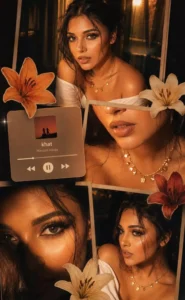
“Warm-toned cinematic portrait collage of a young woman with soft glowing skin, subtle freckles, and glossy nude lips. She has long dark brown hair styled in loose waves with face-framing strands. She is wearing traditional gold jhumka earrings and a delicate necklace, dressed in a deep magenda outfit with a sheer dupatta around the neck. The lighting is golden-hour inspired with rich amber highlights and soft shadows, creating a cozy, intimate mood.The composition is a collage layout with multiple cropped frames of her face—close-ups of eyes, lips, and side profile-arranged aesthetically. Add soft floral elements like beige and orange lilies placed around the frame. Include a blurred music player overlay showing a song playing for a nostalgic vibe. Skin appears dewy and radiant, with minimal elegant makeup.”
Copy Prompt
Why Is This Photo Editing Trend Going Viral?
This photo editing style has taken social media by storm, with thousands of users trying to recreate the same look. The main reason behind its popularity is its stunning combination of vintage charm and cinematic effects. The final images appear incredibly realistic, making them look more like professional movie posters than AI-generated creations.
The collage-inspired design, rich details, and high-quality visuals help these edits stand out from ordinary photos. As a result, they attract more attention, likes, and shares across platforms. The best part is that modern AI tools make this editing style accessible to everyone. With the right prompt, anyone can create eye-catching cinematic images in just a few minutes.
Final Thoughts
Creating this trending aesthetic photo edit is much easier than many people think. If you’re looking to give your photos a unique and professional appearance, this style is definitely worth trying. By following the steps provided above, you can generate stunning images without spending any money.
Give it a try and see how your photos turn out. If you’re interested in discovering more viral AI editing trends, creative photo effects, and easy editing tutorials, be sure to explore our website for the latest updates and guides.