Trending AI Photo Editing Prompt – AI photo editing has taken social media by storm, with new creative styles going viral almost every day. People are using AI tools to create stunning and realistic images that grab attention instantly. The best part is that these AI-generated photos can be created in just a few clicks without needing any advanced editing skills. In fact, many of these images look so natural that it’s hard to believe they were made using AI.
If you also want to create eye-catching AI photos and make your content stand out online, this article is for you. Here, I will share some of the most popular and carefully selected AI photo editing prompts that can help you generate realistic photos using your own face. Along with the prompts, I will also explain the complete process step by step, making it simple and beginner-friendly for everyone.
Trending AI Photo Editing Prompt Details
In this guide, you will find different types of trending AI photo prompts inspired by styles that are currently popular across social media platforms. These prompts are designed to help you turn ordinary pictures into high-quality, professional-looking AI images with realistic details and creative effects.
All the prompts included here are written with proper descriptions to deliver impressive and accurate results. You can easily use them on AI platforms like ChatGPT or Google Gemini to generate unique AI images within minutes. In the next section, I will explain exactly how you can use these prompts to create your own trending AI photos effortlessly.
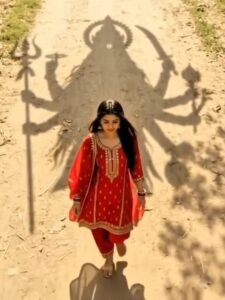
Video Prompt –
Create a cinematic, ultra-realistic 9:16vertical video using my uploaded image as the starting frame and identity
reference
SCENE & MOVEMENT:
A young Indian woman wearing a
beautiful bright red salwar suit with
golden embroidery and a flowing red dupatta walks slowly forward along a sunlit rural dirt pathway. Her long black hair and dupatta move gently with the breeze.
The camera folows her from an
extremely high, straight-down bird's-eye drone perspective. Maintain the same overhead angle and full-body
composition throughout the video.
As she walks forward, the gigantic divine
shadow of Maa Kali follows directly
behind her across the dusty ground. Maa
Kali's shadow has a majestic crown,
flowing hair, multiple arms, a trident, and a sword. The shadow moves naturally in sync with the sunlight and the woman's forward movement, creating the feeling that Maa Kali is walking alongside her and protecting her.
Green tree branches sway gently, and
golden sunlight filters through the leaves, creating beautiful moving shadows across the pathway.
CAMERA MOVEMENT:
The drone camera slowly tracks forward, following the woman from above while maintaining a consistent distance and
framing.Smooth cinematic movement,
no sudden cuts, no camera shake. The
enormous shadow remains clearly visible behind her throughout the shot.
TEXT REVEAL — FINAL MOMENT:As the woman continues walking, the
camera slowly pulls back to reveal more of Maa Kali's enormous shadow.
At the final moment, introduce the exact Hindi text:
मां आा रही है
The text appears dramatically over the
ground in elegant, glowing golden
Devanagari lettering, with a subtle divine golden shimmer and soft light rays. The text fades in smoothly as the music
reaches its emotional climax.
Keep the text perfectly spelled, clear,
readable, and centered in the
upper-middle portion of the frame
without covering the woman or the most recognizable part of Maa Kali's shadow.
AUDIO S ATMOSPHERE:
Powerful devotional cinematic
background music with deep temple
bells, a subtle damru rhythm,
atmospheric wind, and a rising spiritual soundscape. Build anticipation toward the final text reveal.
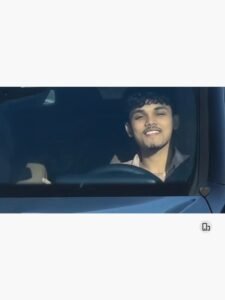
"A continuous, single-take photorealistic cinematic video with NO frame cuts. A young man is actively driving a moving black Mercedes-Benz, viewed from a fixed front-facing camera angle mounted on the hood, looking directly at him through the windshield. He is wearing a light pink plaid shirt, steering with one hand. He looks directly at the camera with a relaxed, happy smile and raises his hand forward to wave directly at the front lens. Bright sunny daytime lighting with realistic reflections on the glass and the outside background environment passing by to indicate driving speed. Smooth continuous motion, 4k resolution, 60fps, 16:9 aspect ratio, ultra-realistic driving."
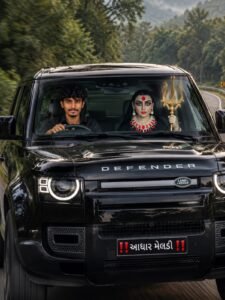
Create a hyper-realistic cinematic image matching the provided reference image as closely as possible. Use my uploaded photo ONLY as the identity/face reference for the male driver. Preserve my face exactly — same facial structure, skin tone, hairstyle, eyes, nose, lips, jawline and natural features. Do not reshape, beautify, age or alter my face.

A young Indian man with my exact face is sitting in the driver seat of a glossy black Land Rover Defender, wearing a black shirt. He is looking naturally toward the camera while holding the steering wheel with one hand. Beside him in the front passenger seat is a divine Meldi Maa/Durga-like goddess, with a traditional divine appearance, dramatic eyes, red bindi, ornate red-and-white jewelry and dark traditional attire, holding a large golden trishul upright in her hand.

The vehicle is driving on a curving mountain road surrounded by dense lush green forest and misty hills. The road and background have realistic motion blur while the car and occupants remain sharp. Keep the black Defender's front design, headlights, grille, roof and glossy reflections exactly like the reference.

The front number plate should read “‼️ આધા મેલડી ‼️” in Gujarati. Maintain the same front-facing camera angle, framing, vehicle position, driver/passenger positions, goddess pose, lighting and overall composition as the reference.

Ultra-realistic photography, cinematic natural lighting, realistic skin texture, detailed clothing and jewelry, realistic windshield reflections, glossy car reflections, shallow depth of field, DSLR look, high detail, 8K, vertical 4:5.

Do not change my identity. Do not add extra people or objects. Keep everything else as close to the reference image as possible
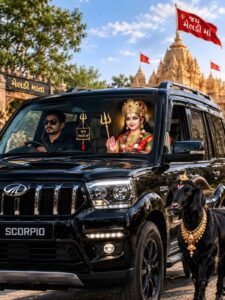
Create a hyper-realistic cinematic image matching the uploaded reference image as closely as possible. Use my uploaded photo ONLY as the identity reference for the male driver. Preserve my face exactly — same facial structure, skin tone, hairstyle, beard/moustache, eyes, nose, lips and jawline. No face reshaping, beautification or identity change.

A young Indian man with my exact face is sitting in the driver seat of a glossy black Mahindra Scorpio, wearing a black shirt and black sunglasses. Beside him sits a beautiful divine Meldi Maa, wearing an ornate golden crown, traditional red-and-green Gujarati attire, heavy gold jewelry and holding a golden trishul, with one hand raised in a blessing gesture.

The scene is outside a magnificent Meldi Mata temple, with detailed golden temple architecture, multiple red religious flags, trees and bright blue sky with soft clouds. A large red flag above the temple reads “જય મેલડી માં”. In the foreground on the right stands a majestic black goat, decorated with a small religious head ornament and multiple luxurious golden necklaces.

Keep the black Scorpio, temple, goddess, goat, flags, composition, camera angle, positions, lighting and framing as close to the reference image as possible. Realistic reflections on the car, natural sunlight, realistic skin and fabric textures, cinematic depth of field, DSLR photography, ultra-photorealistic, highly detailed, 8K quality, vertical 4:5 composition.

Do not change my identity or facial features. Do not add extra people or objects. Keep everything else matching the reference image.
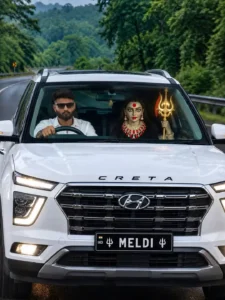
Create a hyper-realistic cinematic image matching the provided reference image as closely as possible. Use my uploaded photo ONLY as the identity/face reference for the male driver. Preserve my face exactly — same facial structure, skin tone, hairstyle, beard, eyes, nose, lips, jawline and natural features. Do not beautify, reshape, age or alter my face.
A young Indian man with my exact face is sitting in the driver's seat of a white Hyundai Creta, viewed directly from the front through the windshield. He is wearing a clean white shirt and black sunglasses, with one hand naturally holding the steering wheel. Beside him in the front passenger seat is a divine goddess-like female figure resembling Maa Durga/Meldi Maa, wearing an ornate traditional red-and-black outfit, detailed jewelry, red bindi, dramatic traditional makeup, and holding a large golden trishul vertically in her hand.
The car is driving on a wet winding mountain road surrounded by dense lush green forest and misty hills, with metal road barriers and a curved-road warning sign visible in the background. The white Creta should have the same front grille, headlights, roof rails and overall appearance as the reference. Keep the black license plate reading “🇮🇳 IND  🔱 MELDI 🔱”.
Exact front-facing composition, same camera angle, framing, proportions, positions of the driver and goddess, realistic windshield reflections, natural daylight, wet road reflections, cinematic depth, highly detailed skin and clothing, realistic car reflections, DSLR photography, ultra-photorealistic, 8K quality.
Do not change the composition or add/remove major elements. My uploaded photo is only for my face identity; everything else should follow the reference image
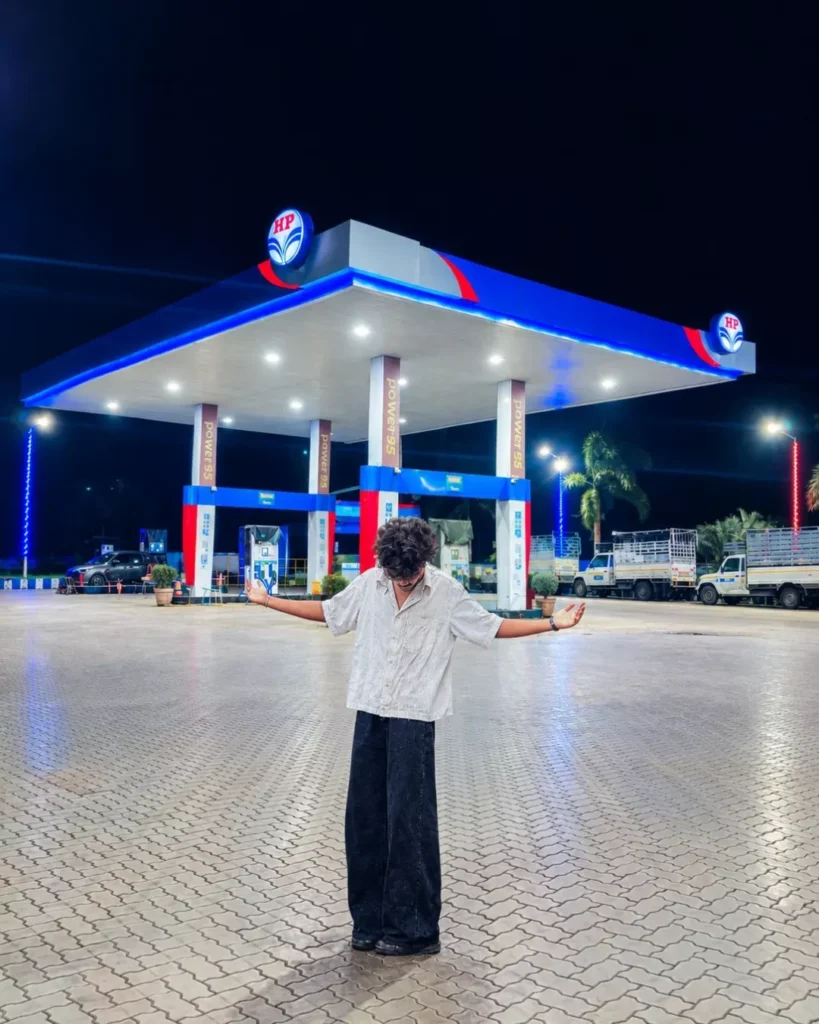
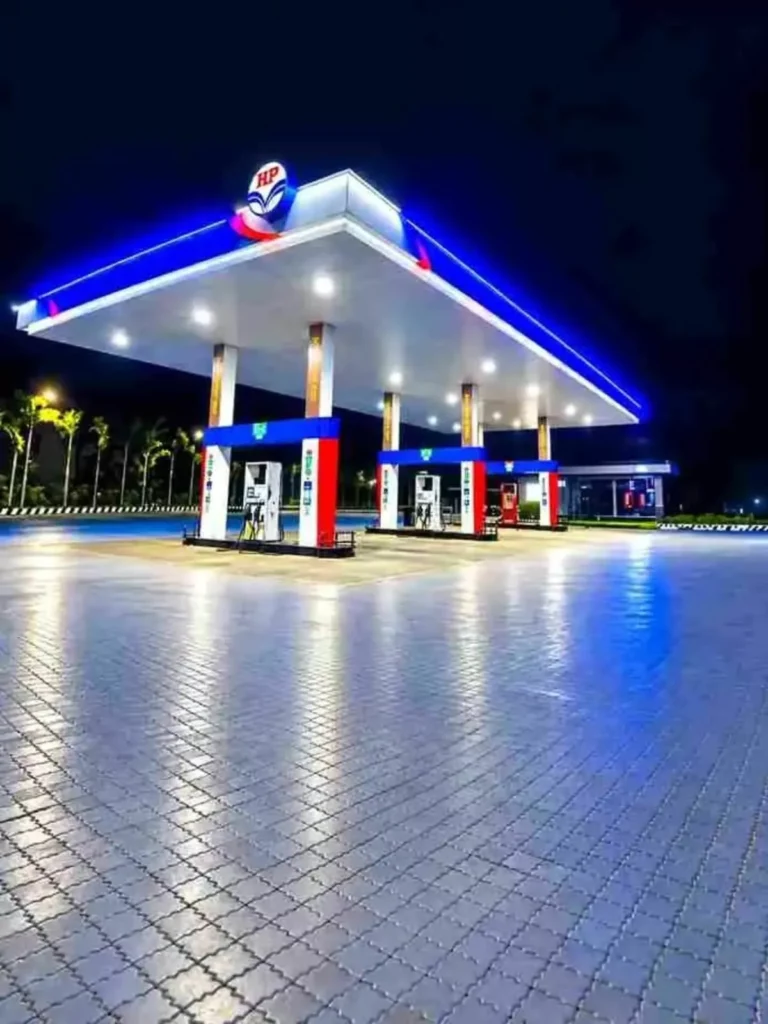
Use the first photo as the exact person reference and the second as the background. Place me naturally into the scene, preserving my face, hairstyle, skin tone, body, clothes, pose, and proportions. Match lighting, shadows, perspective, colors, and camera quality perfectly. Add subtle highlights and realistic shadows for a seamless photorealistic result.
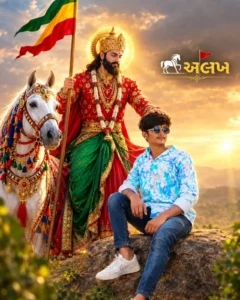
Create a highly realistic cinematic devotional portrait using the uploaded image as the exact reference.

Keep the boy/person exactly the same - DO NOT

CHANGE FACE, identity, facial features, skin tone, hairstyle, body proportions, pose, hands, clothes, sunglasses, or expression. 100% REAL FACE, natural human appearance.

Show the person sitting on the rock exactly as in the reference. Behind him, keep the majestic divine warrior riding a beautifully decorated white horse, wearing traditional royal red and green attire with a golden crown and jewelry. The divine figure gently places one hand on the person's head, giving blessings.

Keep the colorful flag waving naturally in the background. Add a beautiful golden sunset sky, soft clouds, warm divine rays, subtle glow around the deity, realistic atmospheric depth, natural shadows, cinematic lighting, HDR, DSLR photography, ultra-detailed, photorealistic, 8K quality.

Keep the Gujarati "अ" logo/text in the upper-right area clean and sharp.

No cartoon, no CGI, no artificial face, no face change, no distorted body, no extra fingers, no extra limbs, no duplicate person, no blurry face, no plastic skin, no unrealistic anatomy.

Aspect Ratio: 4:5

Style: 100% Photorealistic Cinematic Devotional

Poster

Quality: Ultra HD 8K
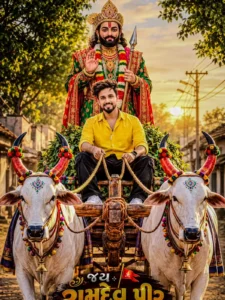
A hyper-realistic, cinematic portrait of a young Indian man sitting on a traditional decorated wooden bullock cart driving through a rustic village street at golden hour sunset. In front of the cart are two magnificent white bulls with painted horns, colorful decorative beads, floral garlands, and small brass bells hanging from their necks. Seated right behind the young man in the cart is a divine, majestic figure of Baba Ramdevji in royal, ornate green and red traditional Rajput attire, wearing an elaborate golden crown, holding a spear (bhal), and giving a blessing gesture. The young man is wearing a stylish yellow casual shirt and dark trousers, smiling at the camera. Warm golden sunlight filtering through trees, cinematic lighting, 8k resolution, highly detailed, photorealistic.

Create a highly photorealistic cinematic 1980s Indian retro portrait using the reference image for exact facial identity, preserving face structure, skin tone and natural features. A confident Indian man with voluminous wavy black hair, full beard and moustache, dark aviator sunglasses, thin gold chain and vintage watch leans casually against a deep maroon classic 1970s–80s luxury sedan. He wears a deep red open-collar shirt, light-blue acid-wash denim jacket and matching high-waisted jeans with a black leather belt. Full-body vertical 4:5 composition, ankles crossed, one hand in pocket. Kerala roadside, coconut palms, golden-hour light, 35mm film look, subtle grain, faded colors, realistic skin, denim, chrome and shadows. No text, logo, distortion or CGI.

Transform my appearance into an authentic 1980s version of myself while keeping my facial features and identity recognizable. Give me an iconic 80s scarf, vintage clothing, retro accessories, and an authentic 1980s atmosphere. Make it look like a real photograph taken in the 1980s, with vintage film grain, natural lighting, realistic skin texture, and period-accurate colors. Do not change my face or make me look like a different person.

Transform the provided couple photo into an authentic nostalgic 1980s Indian portrait. Preserve their facial identity, expressions, pose, proportions, and recognizable composition as closely as possible. Style the man with voluminous slightly long 80s hair, aviator shades, a retro printed shirt, and high-waisted jeans; style the woman with big wavy 80s hair, traditional jewellery, and an elegant vintage silk saree with a bold zari border. Add a classic vintage car or motorcycle if it naturally fits the scene. Use warm faded film tones, natural sunlight, gentle soft focus, subtle grain, light scratches, and an aged printed-photo texture for a genuine old-school 1980s look.

A retro 1980s cinematic portrait of a handsome South Indian man with thick wavy hair, a neat beard, and mustache, casually leaning against the bonnet of a vintage white Hindustan Ambassador car. He is wearing a dark brown open-collar button-down shirt with rolled-up sleeves, tucked into high-waisted beige pleated trousers with a slim leather belt. In the background, a rustic rural village setting with vintage movie posters pasted on weathered walls and traditional tiled-roof houses.

Use the uploaded photo and recreate the same person as if photographed in India in the late 1980s. Preserve the face, skin tone, body shape, smile and overall identity very accurately. Style them in a fashionable 80s outfit like high-waisted jeans, printed shirt/denim jacket, retro accessories and voluminous hair. Use a realistic Indian college/home/street background with warm faded film colors, grain, soft focus and a vintage 1988 photo feel.

Use the uploaded image as the exact face reference for the boy. Keep his face, hairstyle, skin tone, facial features and identity highly accurate.

Create the same ultra-realistic cinematic Gujarati romantic poster: a young couple walking hand-in-hand on a beautiful rural village pathway. The boy wears the same black traditional Gujarati kurta with colorful embroidered jacket/stole, white dhoti-pajama and traditional black footwear. The girl wears the same colorful traditional Gujarati outfit with black skirt, red dupatta, jewelry and ornaments.

Keep the exact same composition, poses, couple placement, background, temple on the left, large tree on the right, rustic hut, stone well, birds, cloudy dramatic sky, greenery, pathway and foreground flowers.

Keep the same Gujarati decorative text at the top, emojis, hearts, typography style, lighting, colors, cinematic depth, HDR look and bottom-left watermark. Only use the uploaded boy reference to accurately recreate the boy's face. Do not change anything else. Vertical 4:5 poster, ultra-realistic, highly detailed, cinematic photography.

Use the uploaded image as the exact face reference for the boy. Keep his face, hairstyle, skin tone, facial features and identity highly accurate.

Use the uploaded image as the exact face reference for the boy. Preserve his facial identity, facial features, hairstyle, skin tone and natural appearance accurately.

Create the same ultra-realistic cinematic Gujarati romantic poster of a young couple dancing together in a beautiful green countryside at sunset. The boy is smiling and holding the girl's raised hand above her head as she gracefully twirls. He wears the same traditional white Gujarati outfit with colorful embroidered borders, white dhoti/pajama, brown traditional shoes and layered necklace.

The girl wears the same elegant white-and-red Gujarati traditional lehenga/chaniya choli with detailed embroidery, red dupatta, jewelry and bangles.

Keep the exact same composition, poses, sunset, dramatic cloudy sky, green fields, distant mountains, trees, puddles and beautiful reflections, flowers and cinematic atmosphere. Keep the same Gujarati decorative text at the top-left, hearts, emojis, yellow underline and bottom-left watermark.

Do not change anything else. Only use the uploaded boy reference for his face. Ultra-realistic, cinematic DSLR photography, vibrant colors, soft golden sunset lighting, realistic details, shallow depth of field, vertical 4:5 poster.

ULTRA-REALISTIC CINEMATIC GUJARATI DEVOTIONAL RAKSHA BANDHAN POSTER

REFERENCE IMAGES
REFERENCE IMAGE 1 = BROTHER
REFERENCE IMAGE 2 = SISTER

Use the uploaded brother and sister photos as the strict identity references.

Preserve their exact facial identity, face shape, eyes, eyebrows, nose, lips, jawline, hairstyle, skin tone, age, and natural facial details. Do not change, beautify, replace, merge, or reinterpret their faces.

The brother must look exactly like Reference 1.
The sister must look exactly like Reference 2.

BROTHER & SISTER — FOREGROUND

Recreate a composition similar to the provided reference poster.

The brother sits on the left side, slightly leaning toward the camera, with a relaxed natural smile. He wears a stylish black traditional-casual kurta/shirt, keeping his appearance youthful and natural.

The sister sits on the right side, close beside her brother, smiling warmly toward the camera. She wears an elegant dark emerald-green traditional Gujarati/Indian outfit with a matching dupatta, intricate embroidered borders, subtle traditional jewelry, earrings and bangles.

The sister lovingly places her hand on her brother's shoulder/wrist area, clearly expressing the emotional brother-sister bond of Raksha Bandhan. Add a beautiful traditional rakhi on the brother's wrist.

Their pose must feel natural, affectionate and candid, with realistic body proportions and anatomically correct hands and fingers.

DIVINE RAMDEVPIR BACKGROUND

Behind the brother and sister, create a large, majestic and clearly visible Ramdevpir Maharaj seated on a decorated white horse.

Ramdevpir Maharaj should appear divine and powerful, wearing a magnificent red and green royal traditional outfit, ornate golden jewelry, embroidered clothing and a highly detailed traditional jeweled crown/turban.

He holds a green-and-red devotional flag with Gujarati text:

"રામાપીર"

A soft golden divine halo should glow behind his head.

The white horse should have a beautiful black mane and elaborate traditional golden/red decorative harness and ornaments.

TEMPLE BACKGROUND

Create a beautiful traditional Gujarati Ramdevpir temple environment in the background.

Include:

- Ancient stone temple architecture
- Detailed carved pillars
- Temple bells hanging on the upper-left side
- A beautiful temple shikhara on the right side
- Small glowing diyas
- Traditional saffron/red flags
- Green trees and soft natural background
- Warm golden sunlight
- Subtle divine atmospheric glow

On the left side, add an old stone wall/signboard containing Gujarati text:

"જય રામાપીર"

Make the text clearly readable and naturally integrated into the environment.

RAKSHA BANDHAN DETAILS

In the lower foreground, place a beautifully decorated Raksha Bandhan thali containing:

- Traditional colorful rakhi
- Kumkum
- Rice grains
- Flowers
- Indian sweets
- Small glowing diya
- Decorative beads

Add subtle flower petals and festive decorative elements around the siblings.

POSTER DESIGN

Vertical 4:5 aspect ratio, premium Instagram festival poster.

COMPOSITION:

- Brother: lower-left foreground
- Sister: lower-right foreground
- Ramdevpir Maharaj + white horse: centered behind them
- Temple visible in the background
- Large devotional atmosphere without hiding the siblings' faces

Use cinematic depth of field, realistic skin texture, natural facial lighting, detailed clothing texture, realistic jewelry, soft golden rim light, HDR, high dynamic range, volumetric sunlight, subtle bokeh and professional Indian festival-poster photography.

TEXT AT BOTTOM

Add large premium Gujarati typography at the bottom:

🌸 એન્ડવાસ મા
હેપી રક્ષાબંધન ❤️

Use bold, elegant Gujarati lettering with a white-to-golden festive effect, subtle shadow and decorative floral elements.

Below it, add:

ભાઈ-બહેનનો પવિત્ર પ્રેમ ❤️

Keep all Gujarati text spelled correctly, sharp, clean and readable.

STRICT REQUIREMENTS

- Use Reference 1 ONLY for brother's face
- Use Reference 2 ONLY for sister's face
- Do not swap their identities
- Preserve facial identity with maximum accuracy
- Keep their natural age and facial proportions
- No additional people
- No duplicate faces
- No distorted hands or fingers
- No artificial-looking skin
- No face morphing
- No random facial changes
- Keep both siblings clearly visible
- Ramdevpir Maharaj must remain clearly visible behind them
- White horse must be fully recognizable
- Maintain the same overall visual hierarchy and devotional feeling as the provided reference
- Ultra-realistic, cinematic, highly detailed, premium Gujarati Raksha Bandhan poster, 8K quality

Use the two uploaded reference images as the ONLY facial and identity references — Reference Image 1 = brother, Reference Image 2 = sister. Recreate the brother and sister as the main foreground subjects while preserving their exact facial identity, facial structure, eyes, nose, lips, jawline, skin tone, hairstyle, age, and natural appearance from the respective reference photos. Do not merge, alter, beautify, or replace their faces.

Create a grand, emotional, ultra-realistic Indian devotional Raksha Bandhan poster, closely matching the composition and visual mood of the provided reference image.

MAIN FOREGROUND SCENE

Show the brother sitting on the left and the sister sitting on the right, facing slightly toward each other during a traditional Raksha Bandhan ceremony.

The sister is lovingly tying a beautiful traditional rakhi on her brother's right wrist, while both have warm, genuine, emotional smiles. Their body proportions and hands must look completely natural and realistic.

Dress the brother in an elegant cream/off-white traditional Indian kurta with intricate golden and red embroidered detailing around the collar and front.

Dress the sister in a beautiful peach-pink traditional Indian saree with delicate golden embroidery, traditional jewelry, bangles, earrings, necklace and subtle festive makeup. Keep her appearance graceful and culturally authentic.

Place a beautifully decorated Raksha Bandhan thali in front of them containing rakhi, kumkum, rice grains, sweets, flowers and a small glowing diya. Add an elegant decorated gift box beside the brother.

DIVINE BACKGROUND

Behind the siblings, prominently place Shree Ramdevpir Maharaj seated on a majestic white horse, appearing divine, peaceful and powerful.

Ramdevpir Maharaj should wear a magnificent traditional royal devotional outfit with rich embroidery, ornate jewelry, traditional colorful turban/crown and a radiant divine aura behind his head. His expression should be calm, benevolent and spiritual.

The white horse should be highly detailed and majestic, decorated with traditional golden ornaments, embroidered harness and festive accessories.

Create a beautiful golden temple interior behind them with intricately carved traditional pillars, arches and ancient Indian temple architecture. Decorate the temple with hanging marigold flower garlands, orange/yellow flowers, traditional lamps, diyas and subtle incense smoke.

Add two elegant saffron/orange devotional flags in the background, creating a strong Gujarati/Ramdevpir devotional atmosphere.

LIGHTING & ATMOSPHERE

Warm golden cinematic lighting, soft divine rays surrounding Ramdevpir Maharaj, realistic diya illumination, subtle volumetric light, gentle incense smoke, glowing particles, rich golden highlights, deep natural shadows and a peaceful spiritual atmosphere.

The brother and sister must remain the primary visual focus, with Ramdevpir Maharaj and the white horse clearly visible behind them without covering their faces.

COMPOSITION

Vertical 4:5 Instagram poster composition.

Brother on lower-left foreground, sister on lower-right foreground, both occupying the main lower half of the frame.

Ramdevpir Maharaj and white horse centered prominently in the upper-middle background.

Symmetrical temple pillars and decorative elements framing the entire composition.

Premium devotional poster photography, highly detailed Indian cultural elements, realistic skin texture, realistic fabric, natural hands and fingers, realistic jewelry, cinematic depth of field, HDR, ultra-detailed, 8K quality, professional festival poster aesthetic.

TEXT

At the bottom, add elegant Gujarati typography:

🙏 હેપી રક્ષાબંધન 🙏

Below it:

ભાઈ-બહેનનો પવિત્ર પ્રેમ ❤️

And at the bottom:

જય રામદેવપીર 🙏

Use beautiful traditional Gujarati decorative typography in a premium golden/cream style with excellent readability.

IMPORTANT IDENTITY & QUALITY RULES

- Brother's face must match Reference Image 1 exactly.
- Sister's face must match Reference Image 2 exactly.
- Preserve their individual identity and natural facial characteristics.
- Do not swap or mix their faces.
- Do not create extra people.
- No modern objects, phones, microphones or western clothing.
- No distorted hands, extra fingers, duplicate limbs or malformed jewelry.
- Keep both faces sharp, natural and clearly visible.
- Maintain realistic age and body proportions.
- Do not change hairstyle unnecessarily.
- Do not make them look like different people.
- Ramdevpir Maharaj must remain clearly visible in the background.
- Overall result should look like a premium professionally designed Gujarati Raksha Bandhan devotional poster, not a generic AI image.

Use my uploaded photo as the exact face reference for the male subject. Keep my face and identity 100% unchanged — same facial features, hairstyle, skin tone, eyes, nose, lips, jawline, expression, and natural skin texture.

Recreate the uploaded reference scene as closely as possible as an ultra-realistic cinematic devotional poster in vertical 4:5 format.

Place me barefoot on the left side, walking naturally through a temple courtyard. I am wearing a dark olive-green full-sleeve shirt and white pants, holding sunglasses in one hand.

On the center-right, create a majestic divine Maa Siddheshwari Mata wearing a rich red saree with heavy golden embroidery, royal jewelry, a golden crown, and multiple arms holding traditional divine objects including a trident and lotus. One hand should be raised in a blessing gesture. Add a powerful glowing golden halo behind her.

Keep the background similar to the uploaded reference: an authentic Gujarati Hindu temple, temple entrance, railings, flags, trees, courtyard, and devotees in the background. Use a dramatic orange-golden sunset sky with warm divine backlighting, golden rays, cinematic atmosphere, realistic shadows, and natural depth.

Keep the same composition, camera angle, subject positioning, scale, colors, lighting, perspective, and overall visual style as the reference image.

Full-body framing, photorealistic DSLR photography, cinematic depth of field, ultra-detailed clothing and jewelry, realistic skin texture, HDR, 8K quality, natural proportions, realistic anatomy, highly detailed environment.

At the top of the poster, add Gujarati devotional typography in the same style as the reference:

"સિદ્ધિ માં હેતુ"
"આગળ આગળ"
"હું તારી ચોકે ચોકે આવું... 🙏💕"

Do not add any watermark, logo, Instagram username, or unnecessary text. Do not add extra people in the foreground. Avoid distorted hands, extra fingers, altered facial identity, changed hairstyle, artificial skin, cartoon appearance, CGI look, plastic skin, blurry details, low-quality textures, incorrect anatomy, or unnatural proportions.

The male subject's face must remain an exact visual match to the uploaded reference photo, with no beautification, face reshaping, age change, skin-tone change, or identity alteration.

Final output: ultra-realistic cinematic Gujarati devotional poster, vertical 4:5 composition, authentic temple atmosphere, warm golden divine lighting, photorealistic DSLR quality, realistic skin and fabric texture, cinematic depth, and premium 8K poster finish.

A cinematic, emotional mid-shot of a young Indian man standing waist-deep in a serene river, crying with tears in his eyes while emotionally hugging and holding a colorful traditional Hindu goddess dashamaa decorated with vibrant yellow marigold flowers, wearing a light-colored printed casual shirt, scenic natural river and distant green trees background, soft dramatic daylight, hyper-realistic, 8k resolution. Text "આવતા વર્ષે જલ્દી પાછા આવજો મારી દશામાં * "Miss you MAA"

Use the uploaded image as the main reference. Show the Dashama idol slowly moving forward into deep, calm water for immersion. Surround the idol with floating rose petals, glowing diyas, and beautiful reflections of the diyas shimmering on the water. Create a peaceful evening atmosphere with warm golden sunlight, gentle water ripples, and a devotional, serene mood. The idol should gradually immerse into the water while the floating diyas continue to glow. At the end, the camera slowly moves upward, revealing a beautiful golden sky and the peaceful water below. Important: Keep the idol's appearance exactly consistent with the uploaded reference image. Do not change the face, facial features, identity, or overall appearance.

A cinematic, continuous 10-second dramatic sequence on an open sunny highway. In the first 3 seconds, a young Indian man [Reference Image 1] gently hands a glowing, translucent red glass heart to a young Indian woman [Reference Image 2]. At second 4, the woman angrily drops it to the ground. At second 6, the camera smoothly tilts down into a dynamic slow-motion shot of the glossy red glass heart shattering into crystal pieces across the asphalt road. In the final 3 seconds, the camera tilts up to a dramatic close-up of the heartbroken man with tears welling in his eyes as the woman walks away in the blurred background. Photorealistic, seamless motion, cinematic color grading, natural daytime lighting, 8k resolution.

Use my uploaded photo ONLY as the exact identity reference for the boy. Keep his face, hairstyle, beard, skin tone, facial features and natural body proportions unchanged. Do not replace or alter his identity.

Create an ultra-realistic 9:16 vertical photograph matching the target image as closely as possible.

Show the boy and a beautiful young Indian girl from behind, walking hand-in-hand up the marble stairs toward a large romantic red-and-pink heart-shaped Hindu temple. Boy on the left, girl on the right. Match the exact pose, spacing, walking position and camera angle of the target.

Boy: black hoodie with Gujarati back design/text “એક પ્રેમ નો દીવાનો” and large red “દિવાનો” with heart, black pants, white sneakers.

Girl: black traditional Indian outfit with tiny white patterns, bright red dupatta and red bottom, long black hair. Her identity is completely generated and she is seen mainly from behind. Her outfit has the Gujarati romantic text/design “એક પ્રેમ નો દિવાની” with a heart.

Temple: huge symmetrical red/pink heart-shaped entrance, heart decorations everywhere, conical heart-patterned roof, golden finial, saffron flag, hanging golden bells, red pillars, glossy red platform, central Ram shrine, and wide light marble staircase.

Background: bright blue sky, soft clouds, green rural landscape and distant hills. No people, vehicles or buildings.

Recreate the target's sky text and decorative elements:
“પ્રેમ ❤️”, Gujarati romantic writing on the upper-left, and “Together Forever ♡” on the upper-right.

Match the target's composition, colors, lighting, perspective, temple details, couple positioning and overall appearance as closely as possible.

Ultra-photorealistic DSLR photography, natural daylight, realistic textures, cinematic but natural colors, accurate hands and feet, no distortion, no watermark or logo.

Do not change the boy's identity. Do not add extra people or objects.

Use my uploaded photo as the exact face and identity reference for the man.

Create a new image that matches the provided target/reference image as closely as possible in composition, environment, pose, clothing, camera angle, lighting, colors, and overall appearance.

IMPORTANT — FACE PRESERVATION: Keep my face and identity exactly the same as my uploaded photo. Preserve my facial structure, eyes, eyebrows, nose, lips, jawline, cheekbones, forehead, hairstyle, hairline, beard, mustache, skin tone, skin texture, and natural facial proportions. Do not beautify, reshape, smooth, age, or modify my face. I must clearly look like the same person from my uploaded photo.

SCENE

Create an ultra-realistic full-body portrait of me standing in front of a large bright red and pink heart-decorated devotional temple/pavilion in an open rural Indian landscape.

The temple should closely match the target image:

- Large red devotional pavilion with a tall conical roof.
- Roof completely decorated with many pink and red heart-shaped ornaments.
- Large curved heart-decorated arch on the right side.
- Red pillars and glossy red platform.
- Several red steps leading toward the shrine.
- Small golden hanging bells underneath the roof.
- Golden finial at the top.
- Small red triangular religious flag waving at the top.
- Decorative arrow-shaped ornament extending from the right side.
- Keep the same overall architecture and decoration as the target image.

MY POSE & CLOTHING

Show me full body, standing in the foreground in almost the same position and pose as the target image.

- Body slightly left of center.
- Facing the camera.
- Natural confident expression.
- Right hand casually inside trouser pocket.
- Left hand hanging naturally.
- One leg slightly forward/crossed in a relaxed pose.
- White full-sleeve button-down shirt with natural fabric folds.
- Black loose-fit trousers.
- White sneakers with subtle grey/red details.
- Natural realistic body proportions.

BACKGROUND

Behind the temple:

- Open rural agricultural fields.
- Green fields and scattered trees.
- Flat Indian countryside.
- Brown dry soil in the foreground.
- No city buildings.
- No vehicles.
- No crowd.
- No extra people.

SKY & LIGHTING

Create the same dramatic daytime atmosphere:

- Large blue-grey and white clouds.
- Bright natural daylight coming through the clouds.
- Cinematic but completely realistic lighting.
- Natural shadows beneath the temple.
- Realistic reflections on the glossy red platform.

CAMERA & COMPOSITION

Match the target image's framing as closely as possible:

- Vertical 4:5 portrait.
- Full body visible from head to shoes.
- Do not crop my head, hands or feet.
- Temple large and centered behind me.
- Large amount of cloudy sky above the temple.
- Brown ground visible in the lower portion.
- Straight-on camera angle.
- Natural 50mm DSLR perspective.
- High-resolution professional photography.
- Realistic depth and proportions.

QUALITY

Ultra-photorealistic DSLR photograph, highly detailed natural skin texture, realistic hair and beard, realistic clothing fabric, physically accurate shadows, natural colors, cinematic depth, sharp facial details, realistic Indian rural environment.

Do not add any watermark, logo, username, extra text, extra people, vehicles, animals or unrelated objects.

The final result should look like a real photograph of me taken at the exact same location and composition as the target image, while using my uploaded photo to preserve my exact facial identity.

Aspect ratio: 4:5 vertical.
Video Prompt –
The subject(s) in the reference image slowly lower their arms and naturally walk toward the temple entrance. They walk up the stairs and enter inside through the heart-shaped entrance. Smooth cinematic camera following movement, realistic walking motion, natural lighting, preserve all faces, outfits and scene details, no extra people, ultra-realistic, smooth motion, 9:16.

Scene 1 (Boy speaking): A young Indian man [Use my reference image] in a red shirt arguing and pleading emotionally with a divine Hindu goddess holding a trident on a sunny beach. The man is speaking the Gujarati dialogue: "Chhodo maa chhodo, hu ene prem karu chu. Hu ena vagar nahi rahi saku."

Scene 2 (Goddess speaking): A divine Hindu goddess wearing a traditional black and red sari with a golden crown, holding the young man's [Use my reference image] arm on the beach. She is speaking strictly in Gujarati: "Na dikra, hu tane eni paase nahi java dau. E tane khoto prem kare che. Chal sidhe sidho gher chal."

Scene 3 (Walking and Water): The divine Hindu goddess holding the young man's [Use my reference image] hand, guiding him towards a traditional rural village house, and then pouring water from an earthen pot into a steel glass for him to drink.

Scene 4 (Blessing): The young man [Use my reference image] sleeping peacefully on a traditional woven cot (charpai). The goddess, radiating a subtle divine glow, is gently stroking his hair with affection in warm sunlight.

A stylish young man.he standing beside a large framed portrait of Godess Maa Meldi. The standing is a dark, luxurious interior with textured walls and warm cinematic lighting. The Maa Meldi artwork glows softly with golden tones, Godess jewelry, floral decorations, and a temple in the background. 100% Face Match) shirt change and colour dark yellow and double pocket. "Coming soon દશામાં વ્રત " Gujarati golden colour and style. Shoes remove. Man looking in frame. Rate 4:5. He is wearing black shirt and white pant

On a sunlit, rustle earthen pathway surrounded by lush green trees and a soft golden hour backlight, a young 24-year-old Indian man with a neat beard and stylish hairstyle is walking casually. He is wearing a clean oversized white crewneck t-shirt, dark charcoal cargo pants, a subtle minimalist silver chain necklace, and white sneakers, with one hand tucked into his pocket. Walking alongside him is Goddess Dashama In a magnificent divine avatar, wearing an elaborate, heavily embroidered traditional red and green saree with intricate gold zari work, & majestic golden crown (mukut), layered gold necklaces, and traditional jewelry. She holds a golden Trisimul (trident) in one hand, while a majestic decorated camel stands right behind her in the background. At the top of the image, elegant typography reads "coming soom", "દશામા વ્રત", and the date "12/8/2026" in golden glowing fonts. Shot on Somy A1, 85mm lens, f/1.8, cinematic lighting, ultra-detailed textures, 16K, 100% fa

Create an ultra-realistic devotional Instagram post (4:5 ratio, 1080x1350). Use my uploaded photo as the only human subject with 100% facial accuracy. Preserve my face exactly as it is no Al face modification, no beautification, no hairstyle changes, no skin smoothing.
Place me standing naturally while leaning against a modern silver metal railing on a rocky viewpoint, wearing an oversized light grey shirt, loose black jeans, white sneakers, and a wristwatch, with both hands in my pockets and a calm, peaceful expression.
Above me in the soft blue cloudy sky, create a large divine portrait of Lord Krishna with glowing blue skin, a peacock feather crown, golden jewelry, a gentle smile, and heavenly light. Position Lord Krishna slightly above and beside me, making it appear that He is lovingly watching over me. Blend the clouds naturally around Lord Krishna for a realistic heavenly effect. Add distant mountains, soft greenery, cinematic blue-hour lighting, dreamy atmosphere, volumetric light rays, shallow depth of field, realistic colors, DSLR photography, 85mm lens, HDR, ultra-realistic, 8K, premium Instagram aesthetic, no text, no watermark, photorealistic masterpiece.

Use my uploaded photo as the EXACT reference. Preserve my face, identity, skin tone, hairstyle, facial expression, body proportions, hands, pose, and every visible detail 100% without any changes. Strict face preservation. Do NOT beautify, replace, reshape, or alter my facial features in any way. My face must remain instantly recognizable.
Create a premium Ultra-HD 8K cinematic devotional Rajputana-style Raksha Bandhan portrait inspired by Baba Ramdev Ji Maharaj.
Scene
I am respectfully tying a sacred Rakhi to Baba Ramdev Ji Maharaj, who is seated gracefully on a majestic white Marwari horse. Baba Ramdev Ji is wearing rich royal red Rajput attire with traditional
ornaments, turban, flower garlands, and holding a saffron Rajput flag. I am standing beside the horse with complete devotion, holding a beautifully decorated pooja thali containing diya, kumkum, akshat, flowers, sweets,
and Rakhi.
My right hand is tying Rakhi on Baba Ramdev Ji's wrist while my left hand
holds the pooja thali
naturally.
The horse has luxurious royal golden harness decorations with traditional Rajasthani
craftsmanship.
Background
Grand Ramdevra Temple visible in the background (not Amer Fort).
Golden sunset sky with dramatic clouds.
Rajasthan desert landscape with soft sand dunes.
Flowing saffron flags, floating flower petals, subtle divine rays of light.
Warm cinematic lighting, volumetric sun rays, spiritual atmosphere.
Composition
Vertical 4:5 Instagram post.
Full-body composition.
Highly detailed horse, realistic fabric textures, intricate jewelry, ultra-realistic skin.
Shallow depth of field, HDR, DSLR quality, cinematic color grading.
Rich Rajputana royal aesthetics with a peaceful devotional mood.
Quality
Ultra-realistic, photorealistic, masterpiece, 8K, HDR, hyper-detailed, sharp focus, premium cinematic lighting, realistic shadows, natural colors, no blur, no distortion.
Negative Prompt
Do not change my face, expression, hairstyle, skin tone, body shape, hands, pose, or
clothing. No
extra fingers, no deformed anatomy, no Al face swap, no cartoon look, no watermark, no logo, no text, no low quality, no blur, no artifacts. Keep my identity exactly the same as the uploaded reference photo.

USE THE UPLOADED REFERENCE IMAGE AS THE ONLY FACE AND IDENTITY REFERENCE FOR THE YOUNG MAN.

STRICT IDENTITY LOCK:
The uploaded reference image must be used exactly for the man's identity. Preserve his face 100% accurately, including facial structure, hairstyle, hair length, skin tone, eyes, eyebrows, nose, lips, ears, beard or clean-shaven look, body proportions, age, and overall appearance. Do not redesign, beautify, stylize, or change his identity in any way. The final person must be instantly recognizable as the same person from the uploaded reference image.

Create an ultra-realistic, highly detailed devotional night portrait in vertical 4:5 ratio.

Scene:
A peaceful rural Indian village at night under a deep star-filled sky. A large old tree stands on the left side with realistic bark texture and hanging branches. Behind them is a lush green agricultural field with distant village trees and warm glowing lights on the horizon during blue-hour twilight.

The young man is sitting on the left side of a traditional wooden charpai (woven cot). He is facing the camera directly with a calm, respectful expression. His hands are joined together in the Namaste pose at chest level. His posture is straight and natural.

He is wearing:
- Black oversized half-sleeve T-shirt with dark green sleeves and collar
- White inner T-shirt visible below
- Olive green cargo jogger pants
- Black and white sneakers

On the right side of the charpai sits Baba Ramdev Pir in a majestic royal appearance.

Baba Ramdev Pir appearance:
- Rich red royal traditional attire with intricate golden embroidery
- Green embroidered royal shawl across the shoulder
- Heavy golden crown decorated with gemstones
- Large glowing golden divine halo behind the head
- Thick black beard and long hair
- Calm, divine facial expression
- Holding a long silver spear vertically in the right hand
- Traditional royal footwear

Lighting:
Warm cinematic golden key light illuminating both subjects naturally. Soft moonlight mixed with warm divine glow from Baba Ramdev Pir's halo. High dynamic range, realistic shadows, volumetric lighting, subtle rim light, premium cinematic color grading.

Composition:
Both subjects are seated on the same charpai with realistic spacing and correct body proportions. Eye-level camera angle, centered composition, perfectly balanced framing.

Text:
At the top center, write in elegant golden Gujarati typography:
"બાબા રામદેવપીર 🐎🙏"

Below the title add an ornamental golden decorative flourish.

Style:
Ultra photorealistic, DSLR quality, 8K, HDR, extremely detailed skin texture, realistic fabric folds, natural shadows, sharp focus, premium devotional artwork, cinematic realism, masterpiece quality, no cartoon, no painting, no extra people, no distortion, no identity changes.

> USE THE UPLOADED REFERENCE IMAGE AS THE EXACT FACE REFERENCE FOR THE MALE ONLY. KEEP THE FACE 100% IDENTICAL. Do not alter his identity, facial features, hairstyle, beard (if any), skin tone, jawline, eyes, nose, lips, expression, or body proportions. Maintain perfect facial resemblance with realistic skin texture, natural lighting, and exact identity preservation.

Create an ultra-realistic cinematic devotional portrait set at the sacred Khodiyar Mata Temple during a breathtaking golden sunset. In the foreground, the reference man is sitting naturally on ancient stone steps beside a beautiful young Indian woman. The man wears a premium black full-sleeve shirt with sleeves slightly rolled up, light grey fitted trousers, clean white sneakers, and a modern wristwatch. His body is slightly turned toward the woman, smiling warmly while making eye contact with her. His posture is relaxed, one arm resting casually on his knee, creating a natural romantic couple pose.

Beside him sits a beautiful Indian woman wearing a luxurious black embroidered Anarkali suit with delicate golden floral embroidery, matching black dupatta, elegant earrings, soft makeup, and long silky hair tied back neatly. She gently holds the man's arm while smiling lovingly into his eyes. The chemistry feels natural, respectful, romantic, and candid.

Behind the couple stands a gigantic divine idol of Maa Khodiyar, occupying most of the background. She is dressed in an exquisite black saree richly embroidered with red and golden borders, heavy traditional Gujarati jewelry, layered gold necklaces, bangles, earrings, flower garlands, an ornate gemstone crown (mukut), and a radiant golden halo glowing behind her head. She holds a beautifully decorated golden Trishul in one hand while raising the other hand in the traditional blessing gesture (Abhaya Mudra). Her face radiates divine peace and compassion.

Beside Maa Khodiyar is her sacred crocodile (Makara) vehicle, highly detailed with realistic scales, decorated with royal ornaments, positioned protectively next to the Goddess.

The background features magnificent ancient temple architecture, palace structures, sacred lake water reflecting the warm sunset, temple domes, saffron flags, floating flower petals, traditional stone carvings, and a peaceful devotional atmosphere. The sky is filled with dramatic orange, golden, and soft pink clouds, enhanced by volumetric god rays shining behind the Goddess.

The composition is perfectly symmetrical with the couple centered in the foreground and the enormous Maa Khodiyar idol dominating the background. Warm cinematic lighting, HDR, realistic shadows, shallow depth of field, DSLR photography, 85mm lens, f/1.8 aperture, ultra-realistic skin texture, photorealistic fabric details, natural facial expressions, masterpiece composition, award-winning photography, devotional aesthetic, vibrant colors, extremely high detail, 8K Ultra HD.

At the bottom center, add elegant Gujarati golden calligraphy text: "ખોડલ માં" decorated with subtle floral ornaments. Do not add Instagram usernames, watermarks, logos, or any extra English text.

> USE THE UPLOADED REFERENCE IMAGE AS THE EXACT FACE REFERENCE FOR THE MALE ONLY. KEEP THE FACE 100% IDENTICAL. Do not alter his identity, facial features, hairstyle, beard (if any), skin tone, jawline, eyes, nose, lips, expression, or body proportions. Preserve realistic skin texture, natural lighting, and perfect facial resemblance.

Create an ultra-realistic cinematic devotional poster featuring the reference man standing beside a beautiful Indian woman in front of the divine idol of Maa Khodiyar. The man wears a premium black traditional kurta with subtle texture, black trousers, and a modern hairstyle. He stands respectfully beside the woman while both lovingly gaze upward toward Maa Khodiyar with peaceful smiles. Their expressions convey devotion, faith, gratitude, and divine blessings.

The woman wears an elegant black embroidered Anarkali dress with intricate red and golden floral embroidery, matching black dupatta, traditional earrings, necklace, bangles, and neatly tied hair decorated with fresh white jasmine flowers. She stands close to the man in a natural romantic couple pose while looking toward Maa Khodiyar.

In the center-right stands a magnificent giant idol of Maa Khodiyar, wearing a luxurious black saree with rich red and golden embroidered borders, heavy Gujarati royal jewelry, multiple gold necklaces, gemstone ornaments, earrings, bangles, flower garlands, an ornate golden crown (mukut), and a radiant divine golden halo shining brilliantly behind her head. She holds a beautifully decorated golden Trishul in one hand while blessing devotees with the other hand in Abhaya Mudra.

At the feet of Maa Khodiyar rests her sacred crocodile (Makara Vahana), highly detailed with realistic scales, royal ornaments, golden decorative collar, and a majestic appearance.

The background features the grand Khodiyar Mata Temple with ancient stone architecture, illuminated temple towers, saffron flags, traditional carvings, glowing oil lamps (diyas), palace-style arches, floating flower petals, dramatic golden sunset clouds, volumetric god rays, warm devotional lighting, and a peaceful spiritual atmosphere.

Decorative brass oil lamps glow in the foreground on both sides, while rose petals gently fall through the air. The lighting is warm, cinematic, and divine with HDR quality, realistic shadows, soft depth of field, global illumination, DSLR photography, 85mm lens, f/1.8 aperture, photorealistic skin textures, highly detailed embroidery, vibrant devotional colors, masterpiece composition, symmetrical framing, award-winning photography, ultra-realistic, 8K Ultra HD.

At the top-left, elegant Gujarati calligraphy reads:

"ખોડલ માં ❤️"

Below it, add the Gujarati devotional quote:

"તમે મારા દિલની ધડકન છો, મારી આશા અને મારો વિશ્વાસ છો."

Use premium white-and-gold typography with decorative flourishes and small heart icons exactly like a luxury devotional poster.

Do NOT add Instagram usernames, watermarks, logos, or any extra branding.
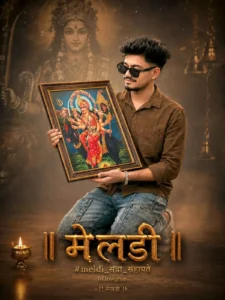
Use the uploaded reference image as the exact identity reference. Keep the face 100% identical. Do not change the face, hairstyle, beard, skin tone, facial structure, body type, or expression. Preserve the person's identity exactly as shown in the uploaded image.
Create a premium ultra-realistic devotional poster. The same young Indian man is kneeling on one knee while holding a large antique wooden frame containing a vibrant portrait of Maa Meldi. He is smiling softly while looking at the framed portrait with devotion. He wears a dark brown full-sleeve shirt, light blue cargo jeans, black sunglasses, a silver bracelet, and grey sneakers exactly like the reference image.
Behind him is a massive faded divine portrait of Maa Meldi with a glowing golden halo. A lion is partially visible on the left side, while traditional hanging brass temple bells appear on the right. The atmosphere is filled with warm golden fog, floating dust particles, volumetric light rays, cinematic haze, soft glow, and a spiritual ambiance.
The framed painting should show Maa Meldi seated on a black goat, holding a trident and traditional divine weapons, wearing rich red and golden attire with detailed jewelry. The frame should have luxurious carved wooden borders with realistic texture.
Place a glowing brass oil lamp (diya) on the lower-left foreground. The floor should have subtle reflections and warm cinematic lighting.
At the bottom center, create large luxurious 3D metallic gold Gujarati typography reading:
॥ મેલડી ॥
Below it write:
#meldi_સદા_સહાયતે
follow_me
!! મેલડી !!
The typography should be embossed, metallic gold, illuminated with soft glow, realistic reflections, and cinematic shadows.
Professional studio photography, eye-level camera angle, centered composition, medium full-body portrait, shallow depth of field, HDR, ultra-realistic skin texture, highly detailed clothing, realistic shadows, volumetric lighting, premium devotional poster design, warm orange and golden cinematic color grading, masterpiece, photorealistic, 8K, DSLR quality, sharp focus.
Negative Prompt: Different face, altered hairstyle, low quality, blurry, cartoon, painting, anime, extra fingers, deformed hands, duplicate person, cropped body, bad anatomy, incorrect text, watermark, logo, oversaturated colors, noise, artifacts, unrealistic lighting, low resolution.
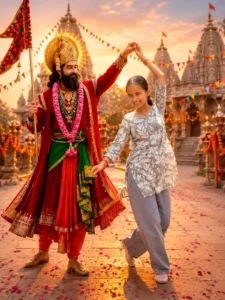
USE THE UPLOADED REFERENCE IMAGE AS THE EXACT FACE REFERENCE. KEEP THE FACE 100% IDENTICAL. Do not change the person's identity, facial structure, hairstyle, beard (if any), skin tone, eyes, nose, lips, jawline, expression, or body proportions. Maintain perfect facial resemblance with natural skin texture.

Create an ultra-realistic cinematic portrait of the reference person dressed as Lord Krishna (Dwarkadhish), standing in the center of the magnificent Dwarkadhish Temple, Dwarka, Gujarat, during the golden sunset. The person wears an extremely luxurious royal deep red velvet traditional outfit with heavy golden zari embroidery, intricate royal detailing, a rich green silk waist sash, layered gold necklaces, sacred ornaments, flower garlands, golden bracelets, rings, embroidered mojari shoes, and an ornate royal crown (mukut) decorated with gemstones and a radiant golden halo glowing behind the head. The person has a calm, divine smile and a majestic appearance.

Beside him stands a young Indian girl wearing a simple light grey floral kurti, loose blue jeans, and white shoes. She smiles naturally while dancing joyfully with him. The reference person gently holds her raised hand as if twirling her in a graceful dance. Their expressions feel warm, happy, and full of positive energy.

The background features the magnificent Dwarkadhish Temple with multiple temple spires, detailed ancient stone architecture, fluttering saffron temple flags, colorful festive buntings, marigold flower decorations, brass oil lamps, flower petals scattered across the stone pathway, devotional festival atmosphere, and soft glowing temple lights.

The sky is filled with dramatic orange, golden, and pink sunset clouds. Warm cinematic sunlight creates beautiful rim lighting around both subjects. Volumetric god rays stream through the temple structures. The marble floor reflects the golden light naturally.

Composition is perfectly centered with both full bodies visible. The reference person occupies the left side while the girl stands on the right. Their joined hands create a graceful dancing pose. The temple remains sharp in the background with a soft cinematic depth of field.

Hyper-realistic photography, DSLR quality, 85mm lens, f/1.8 aperture, HDR, global illumination, ultra-detailed skin texture, realistic fabric folds, natural shadows, cinematic color grading, warm golden tones, volumetric lighting, masterpiece composition, extremely high detail, photorealistic, 8K Ultra HD, award-winning photography, devotional festival aesthetic, vibrant colors, premium portrait quality.
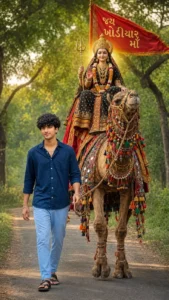
USE THE UPLOADED REFERENCE IMAGE AS THE EXACT FACE REFERENCE. KEEP THE FACE 100% IDENTICAL. Do not alter the person's identity, facial features, hairstyle, beard (if any), skin tone, jawline, eyes, nose, lips, expression, or body proportions. Maintain perfect facial resemblance with realistic skin texture and natural lighting.

Create an ultra-realistic cinematic devotional portrait of the reference person confidently walking on a peaceful rural road while holding the rope of a beautifully decorated camel. The camel is richly adorned with traditional Rajasthani and Gujarati embroidered ornaments, colorful tassels, handcrafted mirror-work decorations, luxurious saddle cloth, golden embroidery, and festive accessories.

Sitting majestically on the camel is Goddess Khodiyar Maa, portrayed with divine beauty and grace. She wears an elegant black and deep red royal saree with intricate golden embroidery, heavy traditional jewelry, layered gold necklaces, bangles, earrings, nose ring, flower garlands, and a magnificent golden crown. She holds a sacred trident (Trishul) in one hand while raising the other hand in a blessing gesture (Abhaya Mudra). A soft divine golden aura glows behind her head.

Behind the Goddess is a large flowing saffron-red devotional flag with golden Gujarati text reading "જય ખોડિયાર માં", fluttering naturally in the wind.

The background features a lush green countryside with dense trees, soft morning sunlight filtering through the leaves, a narrow village road stretching into the distance, warm golden-hour lighting, and a peaceful devotional atmosphere.

The reference person walks slightly ahead of the camel with a confident expression, wearing a stylish dark navy blue casual shirt with rolled sleeves, light sky-blue fitted pants, simple black sandals, a bracelet, and a chain. One hand naturally holds the camel's rope while the other swings casually. His posture is relaxed and heroic, looking directly at the camera.

The composition is perfectly centered with the camel and Goddess occupying the middle while the reference person stands prominently in the foreground. Full-body framing, cinematic perspective, shallow depth of field, realistic shadows, natural reflections, ultra-detailed textures, HDR, volumetric sunlight, DSLR photography, 85mm lens, f/1.8 aperture, photorealistic skin, realistic fabric folds, vibrant colors, masterpiece composition, award-winning photography, ultra-realistic, 8K Ultra HD, devotional festival aesthetic.

Negative Prompt

low quality, blurry, cartoon, anime, CGI, painting, fake face, different face, bad anatomy, deformed hands, extra fingers, extra limbs, duplicate people, cropped body, watermark, logo, text artifacts, unrealistic lighting, plastic skin, oversaturated colors, low resolution, noise, compression artifacts, distorted proportions, motion blur.
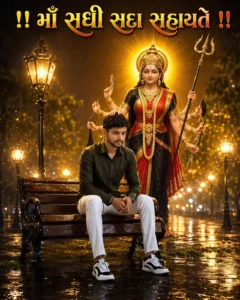
Keep the identity, facial features, hairstyle, skin tone, beard-mustache, body shape and clothes of the uploaded young man intact. The same young man is sitting on a soaked wooden bench in a rainy night park, his face showing concern and emotion.
Behind him, Maa Sadhi is manifested in a divine form. Maintain the face, crown, ornaments and clothes of Mataji as per the reference photo. Mataji is standing in a blessing posture, hands are on the head in blessing but not touching the forehead, in the other hand there is a trident. A bright golden halo is shining behind. Rainy night, wet ground, warm golden light of vintage street lamps, spiritual and reassuring atmosphere. Ultra Realistic, Cinematic Devotional Poster, Photorealistic, Volumetric Rain, Golden Lighting, Bokeh, HDR, 8K, Divine Light Rays, Masterpiece, 4:5 Ratio.
Text (at top): "!! Maa Sadhi Sadha Sahayate !!"
In large gold Gujarati letters, with multicolor glow effect.
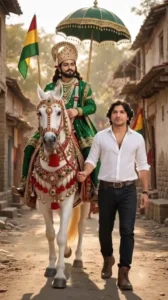
Replace only the man standing beside the horse and holding the rope with the face and body of the person from the uploaded reference photo. The new person should wear a white shirt and black jeans, walking naturally beside the horse while holding the horse rope, realistic body proportions, matching skin tone, accurate facial features, cinematic lighting, natural shadows, rural Indian background with trees and village houses, highly detailed textures, photorealistic, 8K, shallow depth of field, warm cinematic color grading.
Video Prompt –
Use the uploaded image as the only reference. Keep the man's face, horse, deity, clothing, ornaments, lighting, road, houses, flags, framing, composition, and camera angle exactly the same. Do not regenerate or change the background. The old village street must remain 100% identical throughout the video. Animate only the subjects. The young man naturally walks forward while holding the white horse's reins. The decorated white horse walks beside him with realistic synchronized steps, gentle head, ear, and tail movement. The divine rider remains seated calmly with a dignified expression. The umbrella sways softly, the flag waves gently, clothes and hair move slightly in the breeze, and light dust rises with each step. Static locked camera, no zoom, no pan, no cuts, no transitions, ultra-realistic cinematic 9:16.

Replace only the man in the uploaded image with the person from my reference photo. Keep everything else exactly the same: the white and black modified Suzuki Swift, Ramapir murti on the roof, Ramapir flag, number plate, road, sunset sky, background, camera angle, composition, lighting, reflections, shadows, and color grading. The new person should stand in the exact same position with the same pose (hands in pockets), same body proportions, same perspective, and same scale. Use the reference photo strictly for the face, hairstyle, beard, skin tone, body shape, and identity. Maintain 100% face accuracy and do not change the facial features or expression. Blend the new person naturally into the scene with realistic lighting and shadows. Ultra-realistic DSLR photography, SK, high detail, cinematic quality.
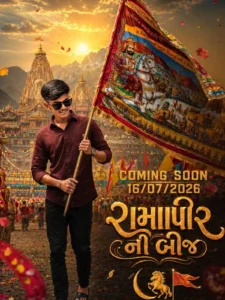
CREATE AN ULTRA-REALISTIC 8K CINEMATIC DEVOTIONAL POSTER. A YOUNG INDIAN MAN (USE UPLOADED REFERENCE PHOTO WITH 100% FACE ACCURACY) STANDS CONFIDENTLY HOLDING A LARGE COLORFUL RAMAPIR FLAG. HE WEARS A MAROON SHIRT, FITTED BLACK PANTS, WRISTWATCH, AND BLACK SANDALS. GRAND RAMAPIR TEMPLE, MOUNTAINS, GOLDEN SUNSET, DIVINE RAYS, FLOWER PETALS, FESTIVAL ATMOSPHERE, DRAMATIC LIGHTING, HDR, DEPTH OF FIELD, PREMIUM COLOR GRADING, ULTRA-DETAILEDREALISM. ADD BOLD TEXT: "COMING SOON 16/07/2026"AND GUJARATI CALLIGRAPHY “રામાપીર ની બીજ" "IN GLOWING GOLDEN STYLE. PHOTOREALISTIC, CINEMATIC MASTERPIECE, 8K QUALITY,
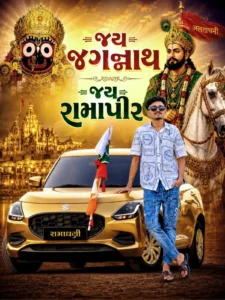
Replace only the man with the uploaded reference person. Keep the exact same standing position. pose, scale, camera angle, black car, background, lighting, shadows, and poster layout unchanged. Use the uploaded reference photo strictly for the new person's face, hairstyle. facial features, beard. skin tone. body proportions, and identity. Maintain 100% face accuracy and natural body proportions. Do not change the car, background, Gujarati text, or any other elements.
Ultra-realistic, seamless replacement, SK UHD, 4:5 portrait.
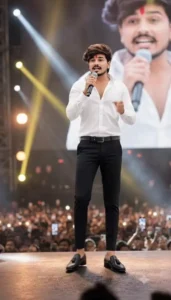
Use the provided image as reference and keep the person exactly unchanged — same face, hairstyle, skin tone, expression, body proportions, gaze direction, pose, and all clothing details intact. Place him at the center of a massive live concert stage, confidently holding a premium wireless microphone while performing or addressing a huge audience. Behind him, an enormous LED screen displays a softly blurred close-up portrait of the same person. Add cinematic stage spotlights, colorful concert lighting, volumetric light beams, atmospheric haze, realistic crowd silhouettes, raised hands, smartphone lights, bokeh effects, shallow depth of field, and natural shadows. Grand arena concert environment with professional stage equipment and immersive audience energy.Ultra-realistic DSLR concert photography, 85mm lens, f/1.8, razor-sharp focus on the face, highly detailed skin texture, natural color grading, realistic lighting, professional event photography, cinematic depth, HDR quality, 4K resolution, vertical 9:16 composition, magazine-cover quality, extremely realistic and authentic appearance, no face alteration, no outfit changes, no body modifications, preserve identity perfectly.
Video Prompt –
Saying - "કાલ રાતે ગર્લફ્રેન્ડની યાદમાં આખી રાત આંસુ વહાવ્યા...
સવારે ઉઠીને અરીસામાં જોયું...
પછી યાદ આવ્યું—અરે બાપા... મારી તો ગર્લફ્રેન્ડ જ નથી!
એટલે સમજાઈ ગયું કે... દિલ નહીં, મચ્છરોએ આખી રાત રડાવ્યો હતો!" 🤣
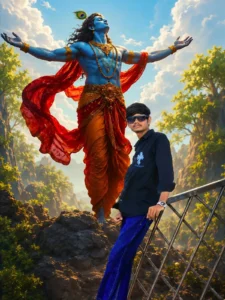
Ultra-realistic cinematic fantasy portrait of a young man standing confidently while leaning against a modern steel railing on a rocky mountain viewpoint, wearing a black full-sleeve shirt with a white chest graphic, blue jeans, red-and-white sneakers, black sunglasses, and a silver wristwatch. Behind him stands a gigantic divine Lord Krishna with radiant blue skin, long flowing black hair, a peacock feather crown, multiple golden necklaces, armlets, and an elegant saffron-orange dhoti with a long translucent red scarf flowing dramatically in the wind. Lord Krishna has both arms spread wide toward the sky, creating a majestic and divine presence. Bright golden sunlight streams through large fluffy clouds in a vivid blue sky, with cinematic volumetric lighting, soft god rays, lush green trees, rocky cliffs, and a mystical valley in the background. Perfect perspective, realistic scale difference between the man and Krishna, ultra-detailed skin textures, premium fantasy realism, HDR, DSLR quality, dramatic contrast, depth of field, sharp focus, highly detailed environment, vibrant colors, masterpiece, 8K, vertical composition (9:16).
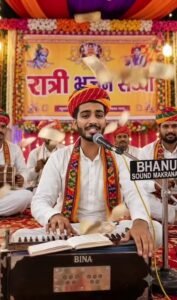
Image Prompt –
Create an ultra-realistic 9:16 vertical image in 8K Ultra HD quality using my uploaded photo as the exact reference for the main person.
Keep my face, hairstyle, skin tone, facial features, expression, and body proportions exactly the same as in the uploaded image. Do not change my identity. Make my face natural, realistic, and highly detailed without excessive beauty filters or artificial glow.
Scene: A traditional Rajasthani "Ratri Bhajan Sandhya" program under a beautifully decorated colorful tent at night. I am sitting in the center on a carpet and playing a traditional Rajasthani musical instrument called Peti (Harmonium). A professional microphone is mounted on a stand directly in front of me at mouth level.
Branding Details: Print the group name "Laxamarwadi Music" in elegant golden Hindi-English style on the front wooden panel of the Peti (Harmonium) as if professionally engraved or painted. Also attach a small professional black-and-golden nameplate on the microphone stand with the text "Laxamarwadi Music". The text should look natural, realistic, and perfectly integrated into the instruments—not floating or digitally overlaid.
Around me, 4–5 musicians are sitting on the carpet and playing traditional instruments such as Dholak, Manjira, Khartal, Chimta, and Harmonium. Everyone is wearing traditional Rajasthani Safa (Pagdi), Kurta, and Dhoti and is fully engaged in devotional music.
Behind us hangs a large professional stage banner with bold, clear Hindi text:
"रात्रि भजन संध्या"
The banner should be colorful, festive, beautifully designed with traditional Rajasthani patterns, and easy to read.
The stage should feature decorative flower arrangements, colorful Rajasthani fabric drapes, LED string lights, warm stage lighting, and a spiritual devotional atmosphere. Add realistic audience seating in the background with soft depth of field.
Lighting: Soft warm stage lights, cinematic lighting, realistic shadows, HDR, natural skin tones, premium DSLR event photography.
Composition: Full-body centered subject, full vertical 9:16 frame, ultra-sharp focus, shallow depth of field, vibrant colors, realistic textures, premium cinematic look, masterpiece, photorealistic, DSLR quality, HDR, 8K Ultra HD.
Negative Prompt: cartoon, painting, illustration, CGI, anime, low quality, blurry face, extra fingers, deformed hands, duplicate people, distorted body, overexposed lighting, unrealistic glow, watermark, logo, spelling mistakes, text errors, cropped face, low resolution, noise, artifacts, plastic skin, fake lighting.
Video Prompt –
Me Ek Gujarati Dialogue Bol Raha hu ए अशोक थारी लुगाई तो गांवमे उभी पानी पूरि खाती हती, मैका लाडले महाऊ, टुम टूम टेढ़ाऊ
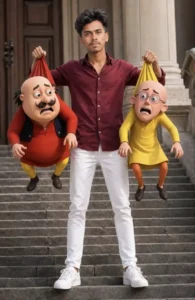
CREATE A HYPER-REALISTIC CINEMATIC IMAGE USING THE UPLOADED FACE WITHOUT CHANGING THE FACIAL FEATURES (100% FACE PRESERVATION). THE MAN IS STANDING CONFIDENTLY ON A STAIRCASE, WEARING A STYLISH DARK RED SHIRT, WHITE PANTS, AND CLEAN WHITE SNEAKERS. HE IS HOLDING MOTU IN ONE HAND AND PATLU IN THE OTHER BY THE BACKS OF THEIR SHIRTS, LIFTING THEM INTO THE AIR.
 MOTU AND PATLU HAVE FUNNY, SHOCKED, AND SCARED EXPRESSIONS. KEEP THEIR ORIGINAL CARTOON APPEARANCE, CLOTHES, AND PROPORTIONS. USE NATURAL DAYLIGHT, REALISTIC SHADOWS, DSLR-QUALITY DETAILS, ULTRA-HD, SHARP FOCUS, VIBRANT COLORS, AND A 9:16 VERTICAL COMPOSITION. THE MAN'S FACE MUST REMAIN EXACTLY THE SAME AS THE UPLOADED PHOTO WITH NO CHANGES.
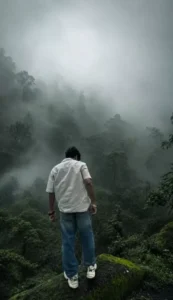
Prompt:-
Transform this image into a breathtaking ultra-realistic foggy forest masterpiece. Add dense natural white fog covering the entire environment, creating a mysterious and cinematic atmosphere. Apply rich forest-inspired color grading with deep emerald green, dark teal, moss green, and earthy brown tones. Enhance the trees, foliage, and background elements to resemble a lush enchanted forest hidden in the mist. Introduce soft volumetric light rays subtly penetrating through the fog, creating depth and realism.Increase overall image quality to ultra-high-definition 4K resolution with razor-sharp details, HDR enhancement, realistic textures, balanced contrast, and natural color harmony. Improve shadows, highlights, and dynamic range while maintaining a realistic appearance. Add a moody woodland aesthetic, dreamy fog layers, atmospheric perspective, and professional cinematic photography grading. The final result should look like a premium DSLR forest photograph captured during a cold misty morning, with ultra-realistic details, immersive depth, soft natural lighting, and stunning visual quality.Style: Cinematic Forest Photography, Moody Nature, Dense Fog Weather, Volumetric Lighting, HDR, Ultra Realistic, Professional Color Grading, 4K Quality, DSLR Shot, Atmospheric Depth, Photorealistic.
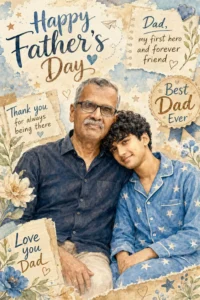
Prompt:-
“Heartwarming Father’s Day watercolor illustration poster, featuring a loving father and his young son sitting closely together, smiling warmly at the camera. The father wears a dark casual shirt, the son wears a soft blue pajama set with a playful star pattern. Cozy emotional family bond, son leaning his head against his father's shoulder. Soft pastel color palette with sky blue, cream, beige, and subtle floral accents. Scrapbook-style background with handwritten notes, doodled hearts, stars, paper airplanes, torn paper elements, and heartfelt Father’s Day quotes. Vintage greeting card aesthetic, hand-painted watercolor texture, delicate brushstrokes, highly detailed realistic faces, warm golden lighting, sentimental atmosphere, elegant typography saying "Happy Father's Day", charming decorative borders, realistic yet artistic portrait, premium greeting card design, nostalgic, wholesome, high-resolution, soft shadows, beautiful composition, professional watercolor illustration, emotional storytelling, portrait orientation, 3:4 aspect ratio.Additional text elements:"Dad, my first hero and forever friend""Thank you for always being there""Best Dad Ever""Love you Dad"Decorative elements: watercolor flowers, stars, hearts, handwritten doodles, vintage paper textures, scrapbook stickers, soft paint splashes, delicate botanical illustrations.Negative Prompt:blurry, low quality, distorted face, extra fingers, deformed hands, duplicate subjects, cropped face, bad anatomy, text errors, watermark, logo, oversaturated colors, harsh shadows, cartoon style, 3D render, low detail, unrealistic proportions, noisy image, pixelated, out of frame.”
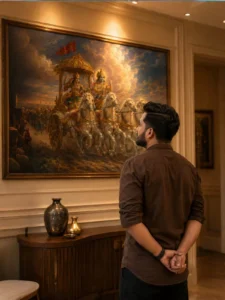
Prompt:-
“Transform the uploaded reference person into an ultra-realistic cinematic Bhagavad Gita inspired scene while preserving ONLY the exact facial identity, hairstyle, beard details, skin tone, and natural human realism from the uploaded reference image. IMPORTANT CAMERA ANGLE: the image should feel naturally clicked slightly from the left-back side perspective, not perfectly centered. The camera must capture both the person and the Mahabharata painting clearly in the frame exactly like a casual cinematic candid photo. The person should stand calmly facing the painting with both hands folded behind the back, giving a mature, leadership, wiseemotionally powerful, and self-controlled aura. The head should be slightly raised upward as if deeply thinking and absorbing the wisdom of Bhagavad Gita. Only a subtle portion of the side jawline and hairstyle should be visible naturally from the left-back angle - not a full side face Outfit should be a realistic premium dark earthy-brown cotton shirt with soft rolled sleeves, natural wrinkles, realistic texture, and masculine minimal Indian aesthetic exactly like a stylish everyday luxury look. Environment should look like a realistic modern Indian luxury room or elegant home interior with soft cream/beige walls and warm cinematic indoor lighting. The Mahabharata painting should be colorful, rich, vibrant, and highly detailed - Lord Krishna driving the divine chariot with Arjuna, white horses in motion, dramatic clouds, spiritual battlefield atmosphere, golden-orange tones, rich blue sky, premium mythological realism. The painting should remain fully visible while the person occupies the lower-right or center-right foreground naturally, creating balanced cinematic composition. Lighting style: realistic warm room lighting with subtle top glow above the artwork, natural indoor shadows, soft highlights on hair and shoulders, realistic depth and cinematic warmth. The overall image must look like real DSLR or iPhone portrait photograph captured naturally inside a luxury modern home - absolutely NO anime look, NO Al-art appearance, NO illustration style. Ultra-photorealistic cinematic photography, authentic skin texture, realistic brown shirt fabric, natural hair details, cinematic color grading, subtle depth of field, premium Instagram aesthetic, emotionally powerful masculine leadership vibe. No text, no captions, no watermark, no Ul elements. Vertical 9:16 composition”
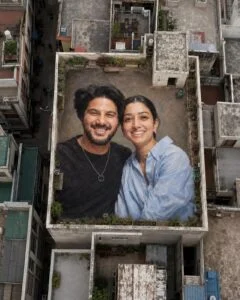
Prompt:-
“Use the uploaded couple reference image as the ONLY source for faces, hairstyles, skin tones, body proportions, clothing, accessories, and identity. Preserve both individuals with 100% accuracy. Do not change face, hair, outfit, age, expression, or appearance. Create a hyper-realistic giant rooftop portrait illusion on a large urban building terrace. The couple appears as a massive realistic artwork seamlessly integrated into the rooftop floor, covering most of the terrace. Capture from a high-altitude drone at a 75-85° top-down angle, perfectly centered, showing the entire rooftop and surrounding city buildings, trees, streets, terrace plants, utility room, and warm rooftop lights. Golden-hour to blue-hour lighting, cinematic realism, natural colors, realistic shadows, extreme facial detail, HDR, ultra sharp focus, professional drone photography, realistic scale illusion, no distortion, no extra people, no extra limbs, no text, no watermark, no Al artifacts.
Style: Hyper-Realistic Giant Rooftop Portrait Illusion Aspect Ratio:
Strictly 4:5 Vertical Quality: 8K UHD, Ultra
Detailed, Masterpiece.”
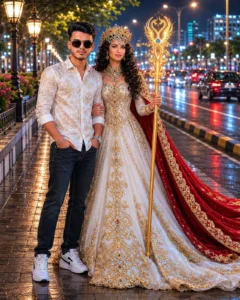
Prompt:-
“Create an ultra-realistic cinematicnight portrait of a stylish young man standing confidently beside a fantasy queen-like woman on a roadside at night. The young man is wearing a white patterned shirt, dark jeans, and sneakers with a calm expression. The woman is dressed in an elegant white royal gown with golden details, wearing a luxurious crown and holding a glowing ornate staff, with a flowing red cape behind her.”
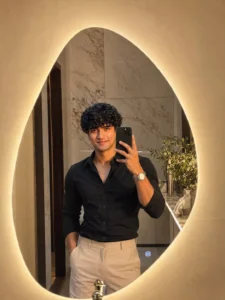
Prompt:-
“Ultra-realistic mirror selfie of a handsome young man standing in front of an irregular organic-shaped LED mirror with a warm golden backlight. He wears a stylish fitted black shirt with beige trousers, luxury wristwatch, neatly styled textured hair, and a confident expression. Holding a black smartphone in his left hand while taking a mirror selfie, right hand casually in pocket. Modern luxury bathroom interior with beige walls, premium marble details, soft warm ambient lighting, minimalist decor, realistic skin texture, cinematic shadows, sharp focus, DSLR photography, shallow depth of field, fashion influencer style, ultra detailed, 4K, photorealistic”
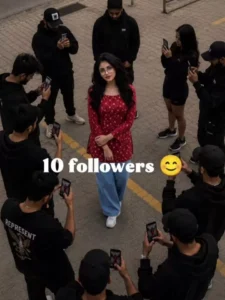
Prompt:-
“Create an ultra realistic cinematic vertical 9:16 aerial drone scene using the uploaded person photo as the exact main character.

STRICT FACE LOCK:
Preserve exact face identity, hairstyle, beard, skin tone, eyes, jawline, body shape, clothing proportions, and natural human anatomy from the uploaded image.

MAIN CHARACTER:
The uploaded person stands naturally in the exact center of the scene.
Confident pose.
Hands in pockets.
Natural body posture.
The main character is the ONLY person looking directly into the camera.

FOLLOWER COUNT:
Generate ONLY approximately [10000] realistic people around the main character.

Examples:
5 followers
10 followers
50 followers
100 followers
1,000 followers
10,000 followers
50,000 followers
1 million followers

IMPORTANT:
The crowd amount must realistically match the exact follower number entered.
Do NOT generate extra unnecessary people.

SMART CROWD SCALING:
- Small follower count = very small crowd
- Medium follower count = medium gathering
- Huge follower count = giant realistic crowd

The camera must automatically zoom out based on crowd size.

CAMERA RULE:
5 followers = close aerial shot
10 followers = small overhead shot
50 followers = medium aerial shot
100 followers = wider drone shot
1,000 followers = large drone shot
10,000 followers = massive cinematic drone shot
50,000+ followers = extreme high aerial shot
1 million followers = gigantic horizon-scale crowd visible far into the distance

CROWD BEHAVIOR:
All crowd members must look toward the main character, NOT toward the camera.

Many people are holding smartphones and recording the main character.

Some people are:
- taking photos
- filming videos
- raising phones in the air
- trying to get closer naturally
- reacting like excited fans

The crowd should behave naturally like fans surrounding a famous influencer.

CROWD STYLE:
- realistic Indian crowd
- unique faces
- no cloned faces
- realistic spacing between humans
- natural body language
- candid crowd behavior
- not posed for camera
- different clothes and hairstyles
- realistic human density

BACKGROUND:
large open grassy field,
huge outdoor maidan,
natural green grass ground,
cinematic outdoor environment,
realistic grass texture,
open atmosphere.

REALISM:
- ultra realistic photography
- grounded physics
- realistic shadows
- realistic perspective
- realistic lighting
- no AI distortion
- no fantasy look
- no pasted effect
- match lighting and color grading between crowd and main character

IMPORTANT:
No text.
No captions.
No follower count text.

QUALITY:
8K,
ultra detailed,
cinematic drone photography,
professional composition,
viral Instagram reel style.”
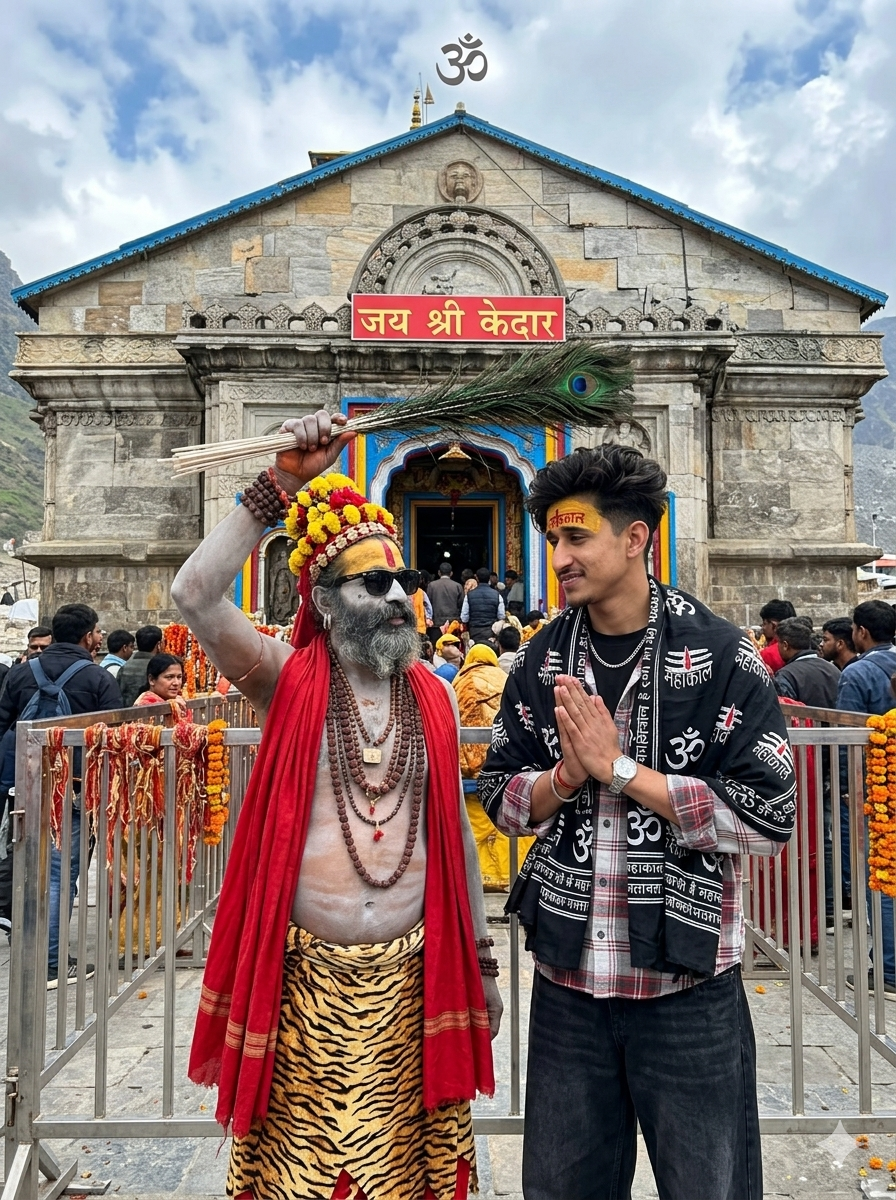
Prompt:-
“ULTRA-REALISTIC 8K CINEMATIC PORTRAIT OF A STYLISH YOUNG INDIAN MAN [USE EXACT FACE FROM UPLOADED IMAGE, FACE MUST MATCH PERFECTLY].A HIGHLY DETAILED, PHOTOREALISTIC IMAGE CAPTURING A SPIRITUAL MOMENT OUTSIDE THE MAJESTIC STONE KEDARNATH TEMPLE. IN THE CENTRE FOREGROUND STANDS AN ASH-SMEARED SADHU WEARING DARK SUNGLASSES, NUMEROUS LAYERED RUDRAKSHA BEAD NECKLACES, AN ELABORATE YELLOW ANDRED FLORAL HEADDRESS, A DRAPED RED CLOTH OVER ONE SHOULDER, ANDA TIGER-PRINT LOWER GARMENT. HНЕ IS HOLDING A BUNDLE OF PEACOCK FEATHERS HORIZONTALLY OVER THE MAN HEAD IN A BLESSING GESTURE OR INTERACT WITH A YOUNG MAN STANDING BEFORE HIM. THE 17 YEARS OLD YOUNG VOLUMINOUS, MESSY DARK WAVY HAIR AND A CLEAN TAPER FADE ON THE SIDES AND THE BACK OF THE HAIR IS LONG AND FLOWS DOWN TO THE NAPE OF THE NECK, IS LOOKING AT HIM WITH A SOFT SMILE, HIS HANDS FOLDED IN A RESPECTFUL NAMASTE, DRESSED IN A BLACK SHAWL HEAVILY DRAPED OVER HIS SHOULDERS, INTRICATELY PRINTED WITH WHITE SANSKRIT 'महाकाल' CALLIGRAPHY AND SACRED'ॐ' SYMBOLS, LAYERED OVER A RED, WHITE, ANDGREY PLAID LONG-SLEEVE BUTTON-DOWN OVERSIZED SHIRT (PARTIALLY UNBUTTONED AT THE TOP), LOOSE-FITTING WIDE-LEG BLACK JEANS (USE UPLOADED DRESS), OUTFIT MUST LOOK REALISTIC WITH DETAILED FABRIC FOLDS, TEXTURE, SHADOWS, AND NATURAL CLOTHING PHYSICS. HE ACCESSORIZES WITH A THIN SILVER CHAIN NECKLACE AND A SILVER WRISTWATCH. OUTFIT MUST LOOK REALISTIC WITH DETAILED FABRIC FOLDS, TEXTURE, SHADOWS, AND NATURAL CLOTHING PHYSICS. FOREHEAD DETAILS: A BROAD SMEAR OF YELLOW SANDALWOOD PASTE ON THE FOREHEAD WITH BRIGHT RED HINDI TEXT 'ॐ महाकाल' WRITTEN OVER IT. THE TILAK SHOULD LOOK AUTHENTIC AND NATURALLY APPLIED.DIRECTLY BEHIND THEM IS THE ICONIC, INTRICATELY CARVED STONE FACADE OF THE KEDARNATH TEMPLE. THE MAIN TEMPLE ENTRANCE IS FRAMED IN BRIGHT BLUE AND YELLOW PAINT, WITH A PROMINENT REDSIGN ABOVE THE DOOR READING "जय श्री केदार" IN HINDI SCRIPT. METAL BARRICADES WRAPPED IN SACRED RED AND YELLOW THREADS AND MARIGOLD FLOWERS SEPARATE THE MAIN SUBJECTS FROM A BUST LING CROWD OF PILGRIMS. A DRAMATIC, PARTLY CLOUDY SKY RISES OVER THE TEMPLE. AT THE TOP CENTER OF THE IMAGE, HOVERING IN THE SKY.ASPECT RATIO 3:4”
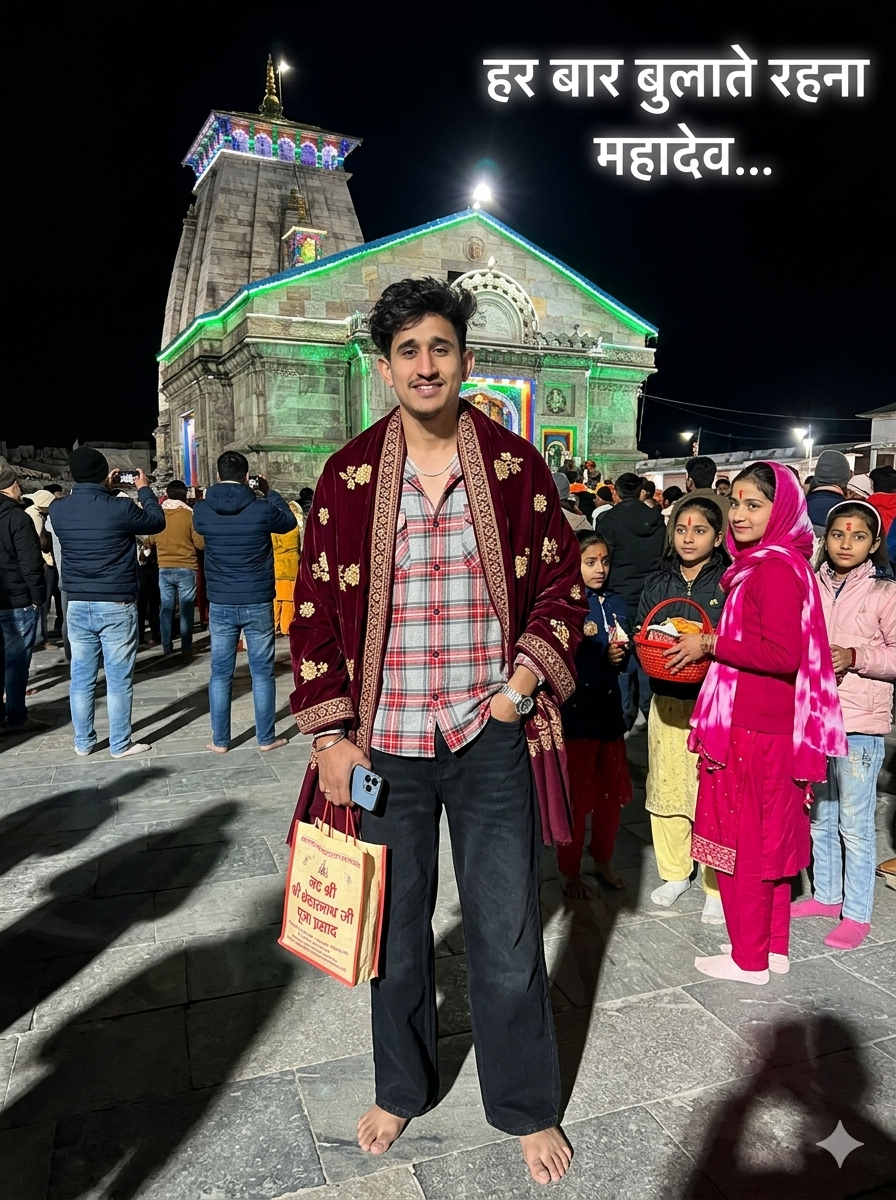
Prompt:-
“ULTRA-REALISTIC 8K CINEMATIC WIDE-ANGLE OF A STYLISH YOUNG INDIAN MAN [USE EXACT FACE FROM UPLOADED IMAGE, FACE MUST MATCH PERFECTLY].जय श्री केदारA HIGHLY REALISTIC NIGHTTIME PHOTOGRAPH OF A 17 YEARS OLD YOUNG INDIAN MAN WITH VOLUMINOUS, MESSY DARK WAVY HAIR AND A CLEAN TAPER FADE ON THE SIDES AND THE BACK OF THE HAIR IS LONG AND FLOWS DOWN TO THE NAPE OF THE NECK, STANDING BAREFOOT IN THE CENTER FOREGROUND AT THE KEDARNATH TEMPLE COURTYARD. HE IS WEARING A RED, WHITE, AND GREY PLAID LONG-SLEEVE BUTTON-DOWN OVERSIZED SHIRT (PARTIALLY UNBUTTONED AT THE TOP), LOOSE-FITTING WIDE-LEG BLACK JEANS (USE UPLOADED DRESS), DRAPED ELEGANTLY OVER HIS SHOULDERS IS A LUXURIOUS DEEP BURGUNDY SHAWL FEATURING INTRICATE TRADITIONAL EMBROIDERY; THE SHAWL HAS SCATTERED SMALL GOLD FLORAL MOTIFS ACROSS THE MAIN BODY ANDA HEAVY BORDER WITH DETAILED GOLD, GREEN, AND RED GEOMETRIC AND FLORAL PATTERNS. OUTFIT MUST LOOK REALISTIC WITH DETAILED FABRIC FOLDS, TEXTURE, SHADOWS, AND NATURAL CLOTHING PHYSICS, HE ACCESSORIZES WITH A THIN SILVER CHAIN NECKLACE AND A SILVER WRISTWATCH. OUTFIT MUST LOOK REALISTIC WITH DETAILED FABRIC FOLDS, TEXTURE, SHADOWS, AND NATURAL CLOTHING PHYSICS. HIS HANDS ARE HOLDING SMARTPHONE (IPHONE 17 PRO), A SOUVENIR BAG DEPICTING THE TEMPLE WITH THE HINDI TEXT "जय श्री केदारनाथ जी" AND "श्री केदारनाथ जी पूजा प्रसाद" AND OTHER HAND KEEP ON HIS POCKET AND LOOKING AT THE CAMERA WITH SOFT SMILE. IN THE BACKGROUND A GROUP OF YOUNG GIRLS STAND TOGETHER. AMONG THEM, ONE GIRL SLIGHTLY TURNS BACK TO LOOK AT THE YOUNG MAN, MAKING SOFT EYE CONTACT. SHE HAS A ROMANTIC YET SHY EXPRESSION, A GENTLE SMILE, AND SLIGHTLY LOWERED EYES, SHE IS WEARING A VIBRANT MAGENTA-PINK TRADITIONAL INDIAN KURTA ANDA MATCHING TIE-DYE PATTERNED DUPATTA GRACEFULLY DRAPED OVER HER HEAD IN HERHANDS, SHE CARRIES A TRADITIONAL REDWOVEN BASKET FILLED WITH TEMPLE OFFERINGS AND HAS A TRADITIONAL RED TILAK ON HER FOREHEAD, THE OTHER GIRLS CONTINUE CHATTING AND RESPONDING CHEERFULLY, SOME SMILING AND CALLING BACK, AND A GROUP OF YOUNG GIRLS STAND TOGETHER. AMONG THEM, ONE GIRL SLIGHTLY TURNS BACK TO LOOK AT THE YOUNG MAN, MAKING SOFT EYE CONTACT. SHE HAS A ROMANTIC YET SHY EXPRESSION, A GENTLE SMILE, AND SLIGHTLY LOWERED EYES, SHE IS WEARING A VIBRANT MAGENTA-PINK TRADITIONAL INDIAN KURTA AND A MATCHING TIE-DYE PATTERNED DUPATTA GRACEFULLY DRAPED OVER HER HEAD. IN HER HANDS, SHE CARRIES A TRADITIONAL RED WOVEN BASKET FILLED WITH TEMPLE OFFERINGS AND HAS A TRADITIONAL RED TILAK ON HER FOREHEAD,THE OTHER GIRLS CONTINUE CHATTING AND RESPONDING CHEERFULLY, SOME SMILING AND CALLING BACK. THE BACKGROUND FEATURES A LARGE CROWD OF PILGRIMS IN WINTER CLOTHING AND SOME PEOPLE HOLDING UP TO TAKE PICTURE. BEHIND THEM STANDS THE MAJESTIC STONE STRUCTURE OF KEDARNATH TEMPLE, BRILLIANTLY OUTLINED WITH BRIGHT WHITE, GREEN, AND BLUE DECORATIVE LIGHTS AGAINST A PITCH-BLACK NIGHT SKY. THE GROUND IS MADE OF LARGE, FLAT STONE SLABS REFLECTING THE BRIGHT LIGHTS, CASTING LONG SHADOWS. THE LIGHTING STYLE IS DIRECT FLASH PHOTOGRAPHY. IN THE TOP RIGHT CORNER, THERE IS A GLOWING WHITE HINDI TEXT OVERLAY THAT READS: "हर बार बुलाते रहना महादेव...".ASPECT RATIO 3:4”
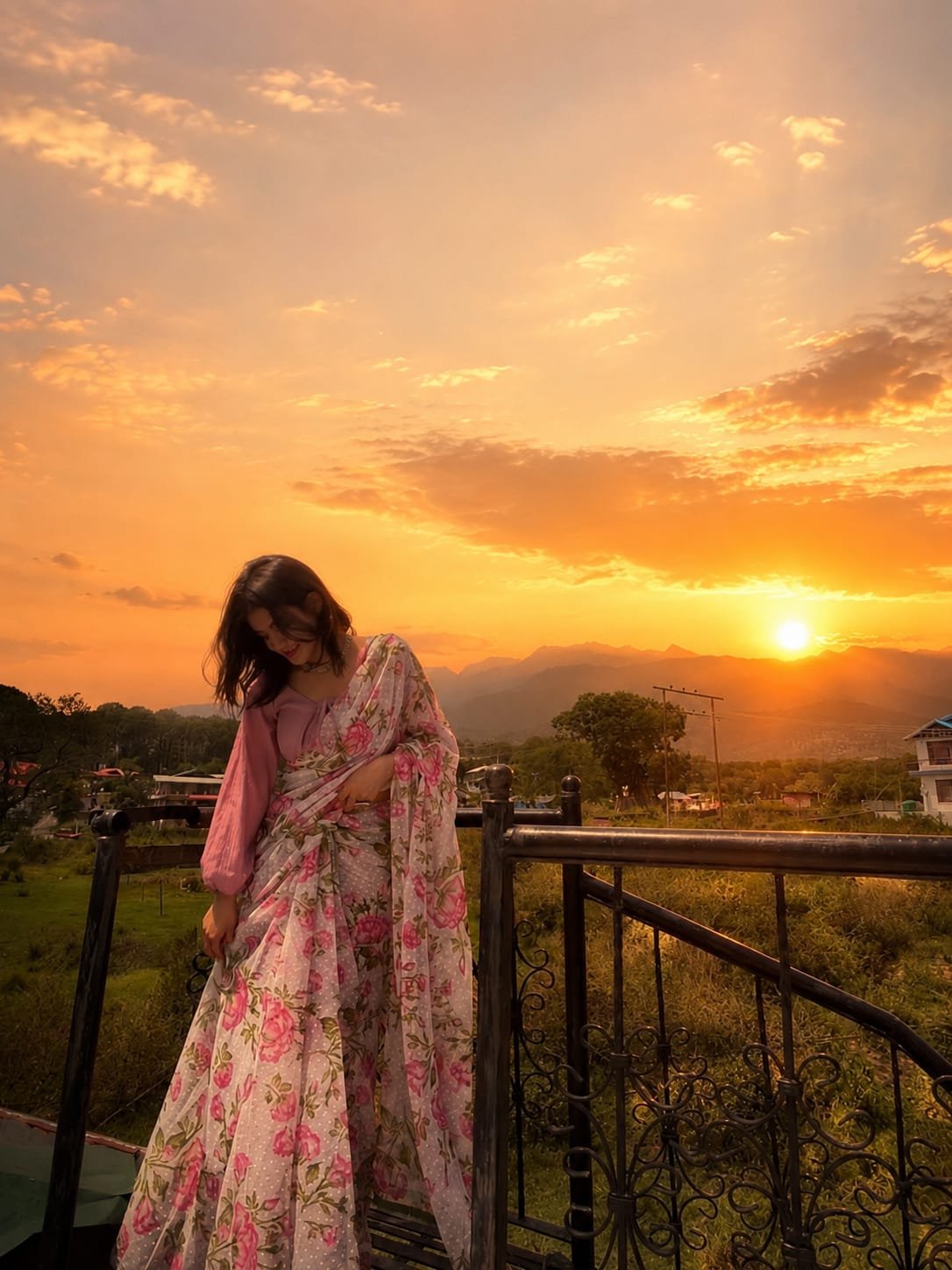
“Add a soft glowing sunset sun behind me with warm golden-hour lighting that enhances the background naturally without overexposing my face. Keep my face, skin tone, facial features, body shape, and overall look completely realistic and unchanged. Use subtle golden and orange tones, soft sun rays, and a dreamy cinematic glow with balanced lighting for clear facial visibility. Avoid any blur, distortion, or AI-like alterations. Maintain a clean, natural, high-quality sunset aesthetic.”
How to Create Your AI Image
If you want to make trending AI images like these, start by copying any prompt shared in this article. After that, open the ChatGPT website or app and paste the prompt into the chat box. Then, tap the plus (+) icon to upload your photo. Once everything is ready, click the “Generate” button and wait a few seconds. The AI will quickly create a realistic and eye-catching image for you. After the image is generated, you can easily download and save it to your device. You can also use the same method on Google Gemini to create similar AI-generated images.
Conclusion
We hope this guide helped you understand how to create trending AI photo edits in a simple way. Now you can easily generate your own stylish AI images without any difficulty. If you want more creative and viral AI photo editing prompts, make sure to visit our website for the latest updates and ideas. If you enjoyed this article, don’t forget to share it with others!